How to Add ChatGPT to Your Meshtastic Network (AI Bot Guide)
Bring ChatGPT AI to your Meshtastic mesh network with a simple Python bot. One internet connected node serves the whole mesh, enabling instant answers for survival, field ops, education, and more showcasing just how flexible and extensible Meshtastic can be.

A few months back I tried sending voice messages over Meshtastic. That experiment went further than expected and got a ton of attention, turns out the community loves seeing these little radios pushed past their limits. So I kept going. This time, I built an AI bot that brings GPT-powered responses directly to your mesh network.
Here's the idea: one node with internet access acts as a brain for your entire mesh. Anyone on the network sends a message starting with ! and the bot fires back an AI-generated answer. No special app, no firmware changes, no complex setup on the other nodes. Just a Python script running on one machine.
Why This Actually Makes Sense
Most AI integrations I've seen for Meshtastic either involve complex MQTT routing or try to run models locally, which means you need serious hardware and the responses are often garbage. This approach skips all of that. One internet-connected node, one Python script, GPT-4o-mini doing the heavy lifting.
The use cases are genuinely useful:
- Emergency situations where you need quick medical or survival info
- Remote expeditions, plant ID, weather, equipment troubleshooting
- Off-grid field ops where you need fast technical lookups
- Hiking groups wanting a shared knowledge base without cell service
The whole thing works on a hub-and-spoke model. Your bot node sits in the middle connected to both the mesh and the internet. Everyone else just uses their Meshtastic devices like normal, no configuration needed on their end.
What You Need
Hardware:
- Any Meshtastic device (T-Beam, Heltec, LilyGo, etc.)
- USB cable
- A computer running Windows, macOS, or Linux
- Internet connection on the bot machine
Software:
- Python 3.8 or newer
- An OpenAI API key
Installation
Step 1: Clone the Repo
git clone https://github.com/HarborScale/meshtastic-ai-bot.git
cd meshtastic-ai-bot
Step 2: Install Dependencies
pip install -r requirements.txt
That pulls in meshtastic, pyserial, PyPubSub, openai, and dearpygui — everything you need.
Step 3: Connect Your Device
Plug your Meshtastic device in via USB and make sure it's already connected to your mesh network. Quick sanity check: open the Meshtastic app or CLI and confirm it can see other nodes before moving on.
Step 4: Get an OpenAI API Key
Head to platform.openai.com, create an account if you don't have one, and generate an API key. Add a few dollars of credits, GPT-4o-mini is extremely cheap. Even heavy usage should stay well under $5/month.
Step 5: Launch the Bot
python meshtastic_ai_bot.py
A GUI window will open. It runs on DearPyGui so it works natively on Windows, macOS, and Linux, no extra system dependencies needed.
Configuration Walkthrough
The interface is split into a few sections. Here's what each one does.
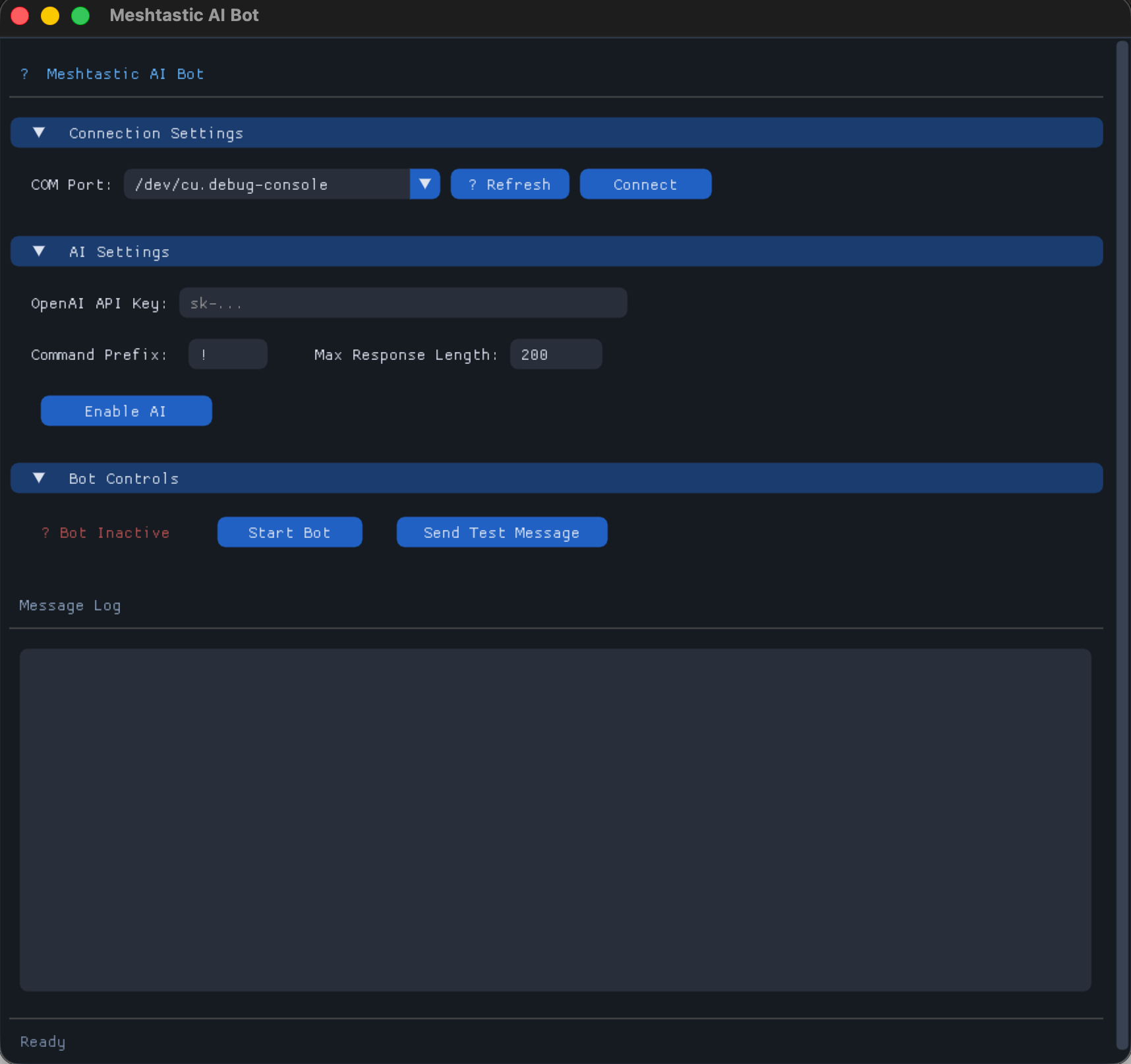
Connection Settings
Hit the ⟳ refresh button to scan for serial ports. Your Meshtastic device should show up in the dropdown. Select it and click Connect. The log will confirm:
[2025-01-15 10:30:15] Connecting to Meshtastic device on COM3...
[2025-01-15 10:30:16] Connected to Meshtastic device successfully
[2025-01-15 10:30:16] Connected to node: 123456789
AI Settings
OpenAI API Key paste it in here. It's masked, stored in memory only while the app runs.
Command Prefix the character that triggers the bot. Default is ! but you can use anything:
!What's the weather like at altitude??How do I treat a sprain?@Tell me about edible plants
Max Response Length — Meshtastic caps text messages at around 240 characters. I recommend leaving this at 200 to stay safe. The bot trims anything longer automatically.
Once you've filled everything in, click Enable AI.
Bot Controls
Once you're connected to both Meshtastic and OpenAI, hit Start Bot. The status indicator goes green and the bot starts listening for your command prefix across the mesh.
Send Test Message is useful for confirming your setup actually works end-to-end before you rely on it.
Using the Bot
From any node on the network, just send a message starting with your prefix:
!How do I start a fire in wet conditions?
!What's 150 kilometers in miles?
!Symptoms of altitude sickness
!Best way to purify water from a stream?
The bot responds in a few seconds:
Start fire in wet conditions: 1) Find dry tinder inside dead branches
2) Build platform of dry logs 3) Use birch bark/fatwood 4) Create windbreak
5) Start small, build gradually. Carry dry tinder in waterproof container.
Response time is typically 2–5 seconds depending on your internet connection.
How It Works Under the Hood
The bot subscribes to Meshtastic's message events via the pubsub library. Every text message that comes in gets checked for the command prefix. If it matches, the query goes to OpenAI with a system prompt that forces brevity:
system_prompt = f"""You are a helpful assistant responding via Meshtastic radio network.
Your response MUST be under {self.max_response_length} characters. Be concise and helpful.
If the query requires a long answer, provide the most important information first."""
The response gets trimmed if needed and broadcast back to the mesh via interface.sendText(). Meshtastic handles the rest, distributing it to all nodes in range.
Message deduplication is built in so the bot never processes the same packet twice.
Customizing the System Prompt
Want the bot to behave differently? Edit the system prompt directly in the code:
system_prompt = f"""You are a survival expert responding via radio.
Responses must be under {self.max_response_length} characters.
Prioritize safety and practical advice."""
You can make it a field medic, a navigation assistant, a local wildlife guide — whatever fits your use case.
Honest Limitations
A few things worth knowing before you rely on this in the field:
- Internet required if the bot node loses connectivity, AI stops working. The rest of the mesh keeps working fine.
- Public channel only right now it only monitors the default public channel
- No memory each query is independent. Follow-up questions won't have context from previous ones. (PRs welcome if you want to tackle this)
- Response quality 200 characters forces very compressed answers. Good for quick lookups, not for nuanced explanations
- API costs tiny, but they're real. Keep an eye on your usage dashboard
What's Next
This is a solid foundation but there's a lot of room to grow:
- Multi-model support swap in different AI providers or specialized APIs (weather lookups, plant ID, etc.)
- Conversation memory let users ask follow-up questions with context
- Response caching store common answers locally to cut API calls and latency
- Private channel support respond on channels other than the default public one
- MQTT bridge trigger the bot remotely or relay responses across disconnected mesh segments
If any of those sound interesting to you, the repo is open github.com/HarborScale/meshtastic-ai-bot.
This project is a nice proof of what's possible when you treat Meshtastic as a platform rather than just a radio. The mesh handles communication, the internet handles compute, and you end up with something genuinely useful in the field. Features like MQTT already showed the community is hungry for this kind of extensibility, AI is just the next step.