RAK WisMesh Tag Review: The Best Meshtastic EDC You Can Buy Right Now
The SenseCAP T1000-E has been the go-to EDC Meshtastic device, until now. RAK's WisMesh Tag matches it on range, doubles the battery life, and builds it better. Same price. Full real-world test inside.
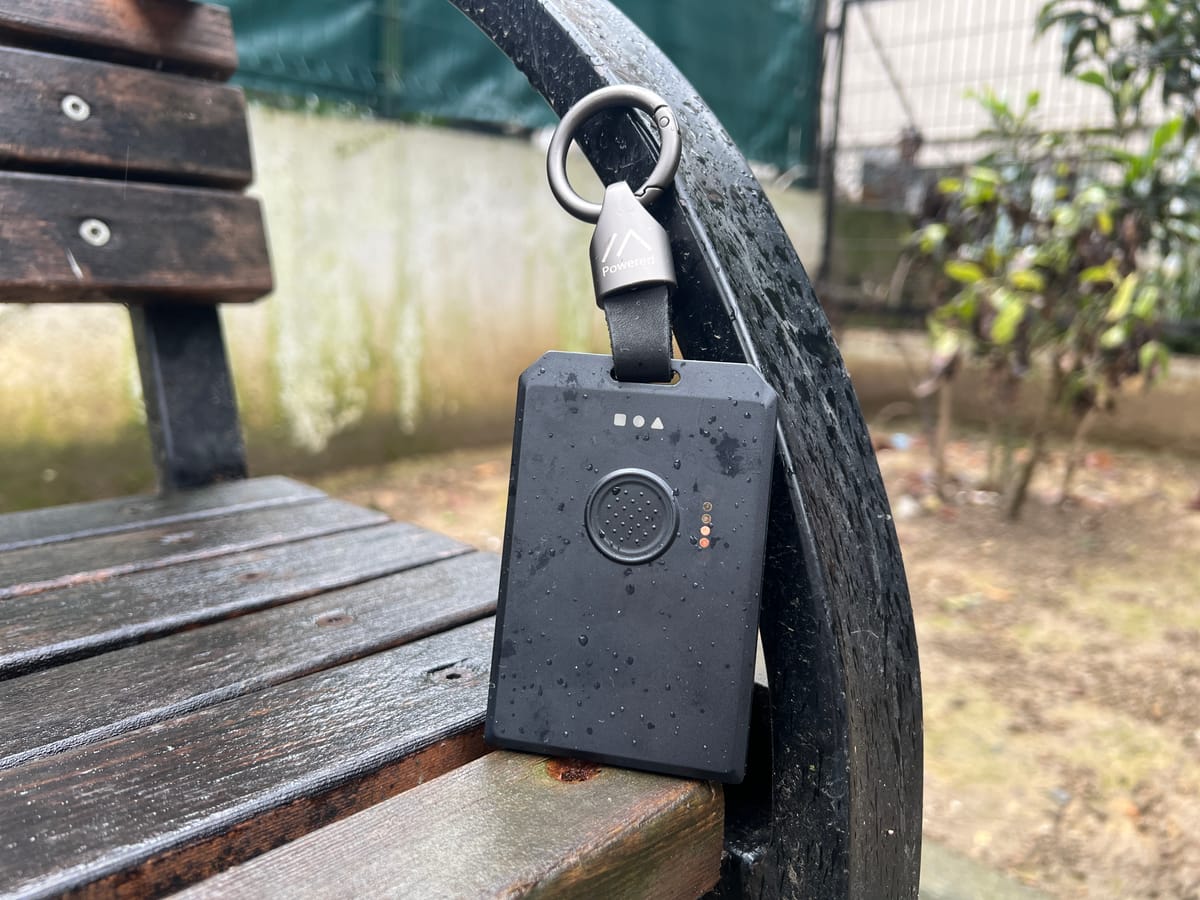
If you've been around the Meshtastic community for any length of time, you already know the SenseCAP T1000-E. Small, reliable, solid range, pocketable, it earned its reputation as the go-to EDC device and honestly there wasn't much of a competition. That's not a dig at other devices, it's just that nothing at the same price point came close enough to make you think twice.
Then RAK Wireless sent over the WisMesh Tag, and after weeks of real-world testing, range walks, battery drain tests, GPS comparisons, water tests, daily carry, we can say with confidence: the game has changed. The WisMesh Tag doesn't just compete with the T1000-E, it wins on most of the metrics that actually matter for an EDC device. It's not perfect, and we'll get into everything honestly, but if you're shopping for a compact Meshtastic device right now, this review is going to change what you end up buying.
We're going to do a full deep dive here, every section, every test, nothing assumed. Let's get into it.
Unboxing and First Impressions
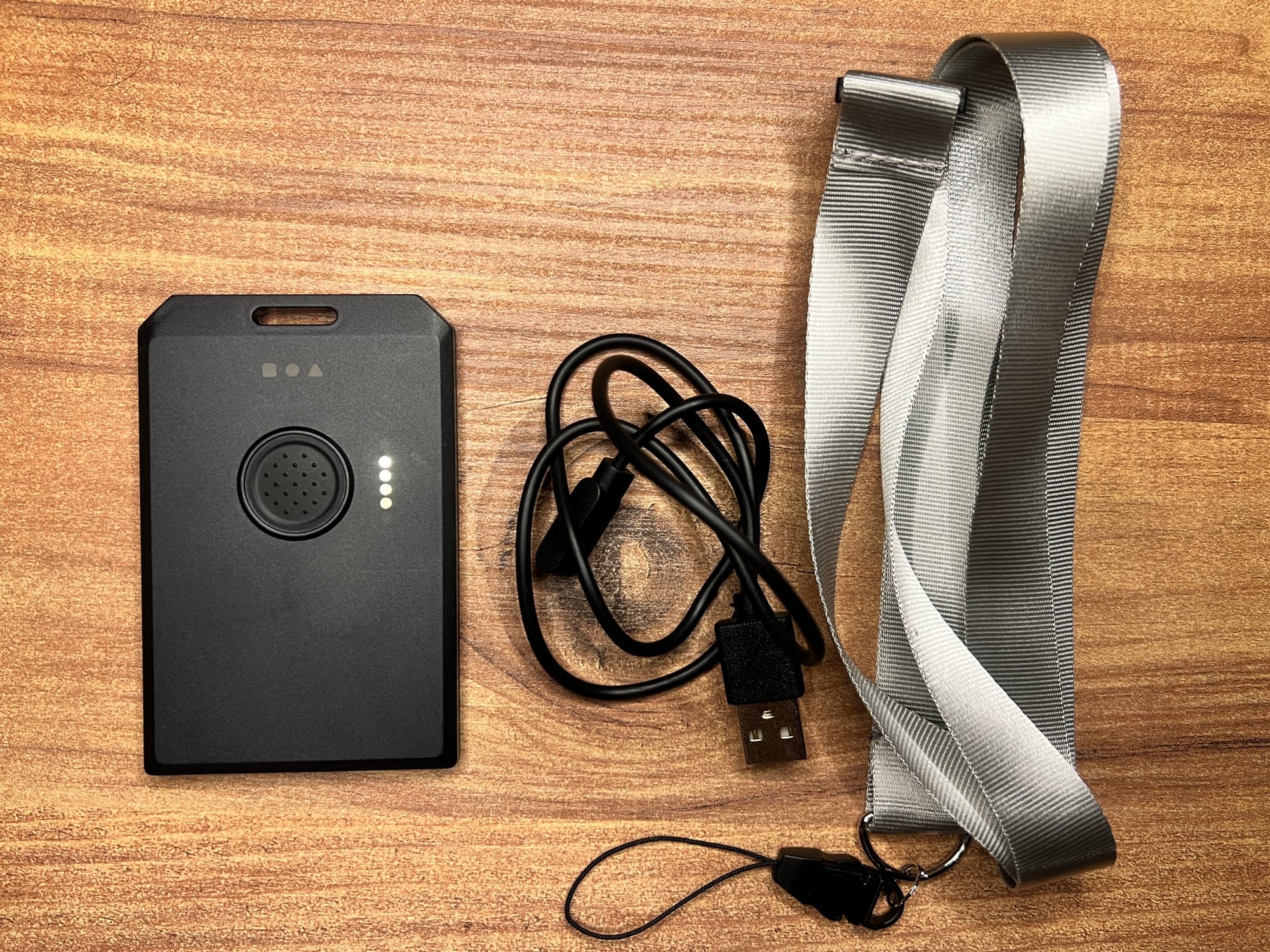
The packaging immediately signals that RAK took this seriously. Everything is clean and thought-out, you open the box and you get the device, a charging cable, and a lanyard. That lanyard might seem like a small detail, but it comes included at the same price point as other EDC-style devices. In other words, this isn’t a cost-cutting compromise or a cosmetic extra, it’s a well-considered, user-focused design choice.
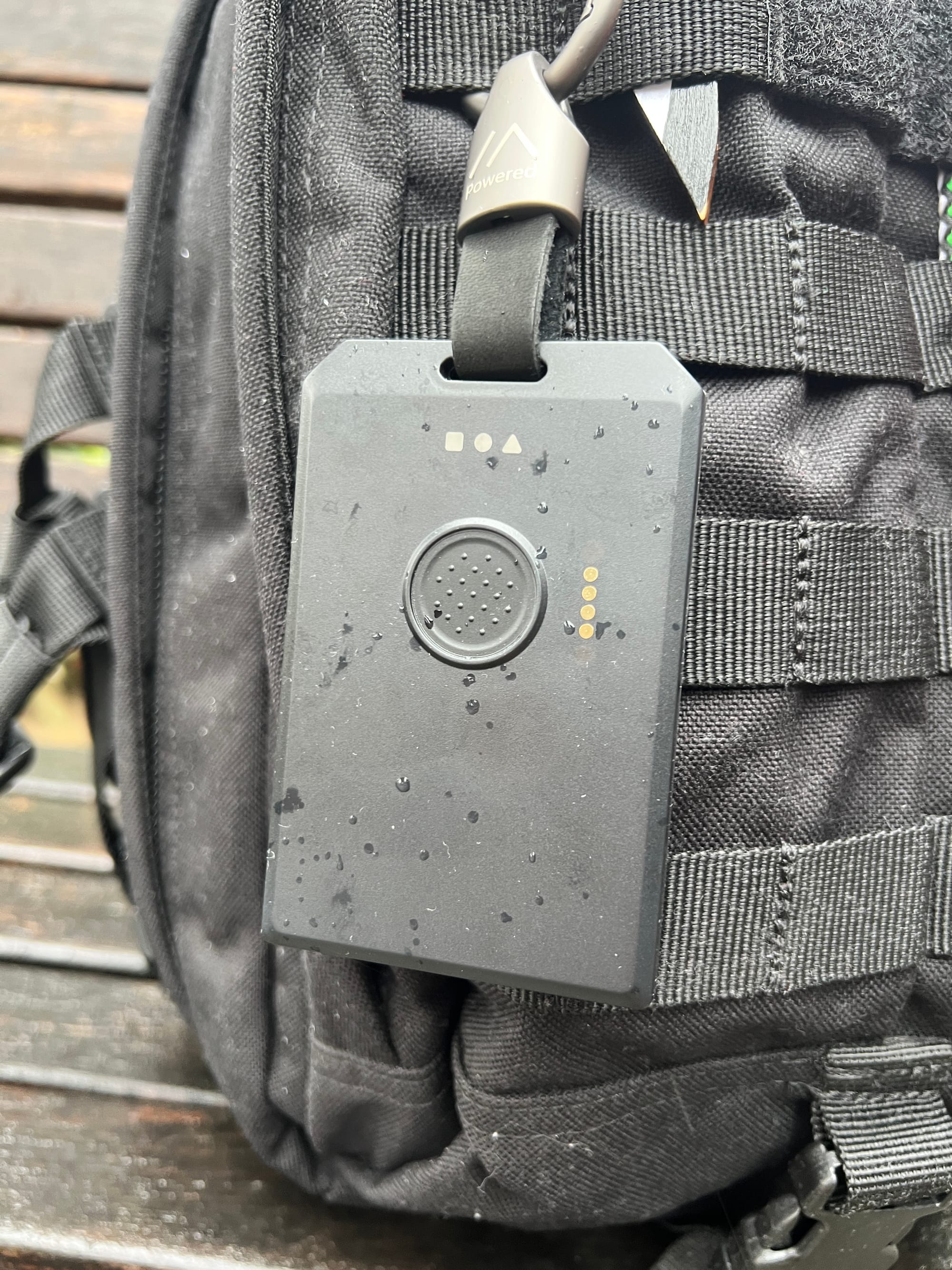
But the real story starts the moment you pick the device up. The WisMesh Tag has, without question, the best build quality of any Meshtastic device we have ever reviewed. And we've reviewed a lot of them. The chassis feels solid and premium in the hand, not plasticky, not hollow, not light in that cheap way. It has weight and rigidity that gives you confidence. The IP66 rating backs that up: fully dust-tight, and rated to withstand powerful water jets from any direction. We'll get to how that held up in testing, but just holding the device, you believe it.
The front button is one of those design decisions that sounds minor until you've used devices where it's done wrong. RAK gave it a textured surface, not aggressive, just enough that your thumb lands on it naturally and you know immediately whether you've pressed it. In gloves, in the dark, mid-hike with cold hands, you can interact with this device without ever looking at it. That's the standard it should be held to, and it clears it easily.
Then there's the back, which is where RAK really made a thoughtful decision. There is a dedicated button: for reset, and DFU. If you've ever tried to enter DFU mode on other Meshtastic devices by performing some combination of pressing, holding, releasing, reconnecting a magnetic charger in a specific sequence, you know exactly why this matters. RAK just eliminated all of that. It's one of those quality-of-life decisions that tells you the people who designed this device have actually used other Meshtastic devices and got frustrated by the same things we all do.
The LED setup is another step up. Three LEDs, each with a completely dedicated role:
- 🔴 RED: Charging indicator, lights up when USB is connected. The device can charge even when switched off, which is genuinely useful.
- 🟢 GREEN: Device state, solid when powered on, breathing in BLE DFU mode, blinking for MCU activity.
- 🔵 BLUE: Message indicator, lights up when a message is received.
No more staring at a single blinking LED and trying to decode whether you're looking at a heartbeat, a charging state, an error, or an incoming message. Three lights, three jobs, immediately obvious. It's a small thing that makes daily interaction with the device dramatically cleaner.
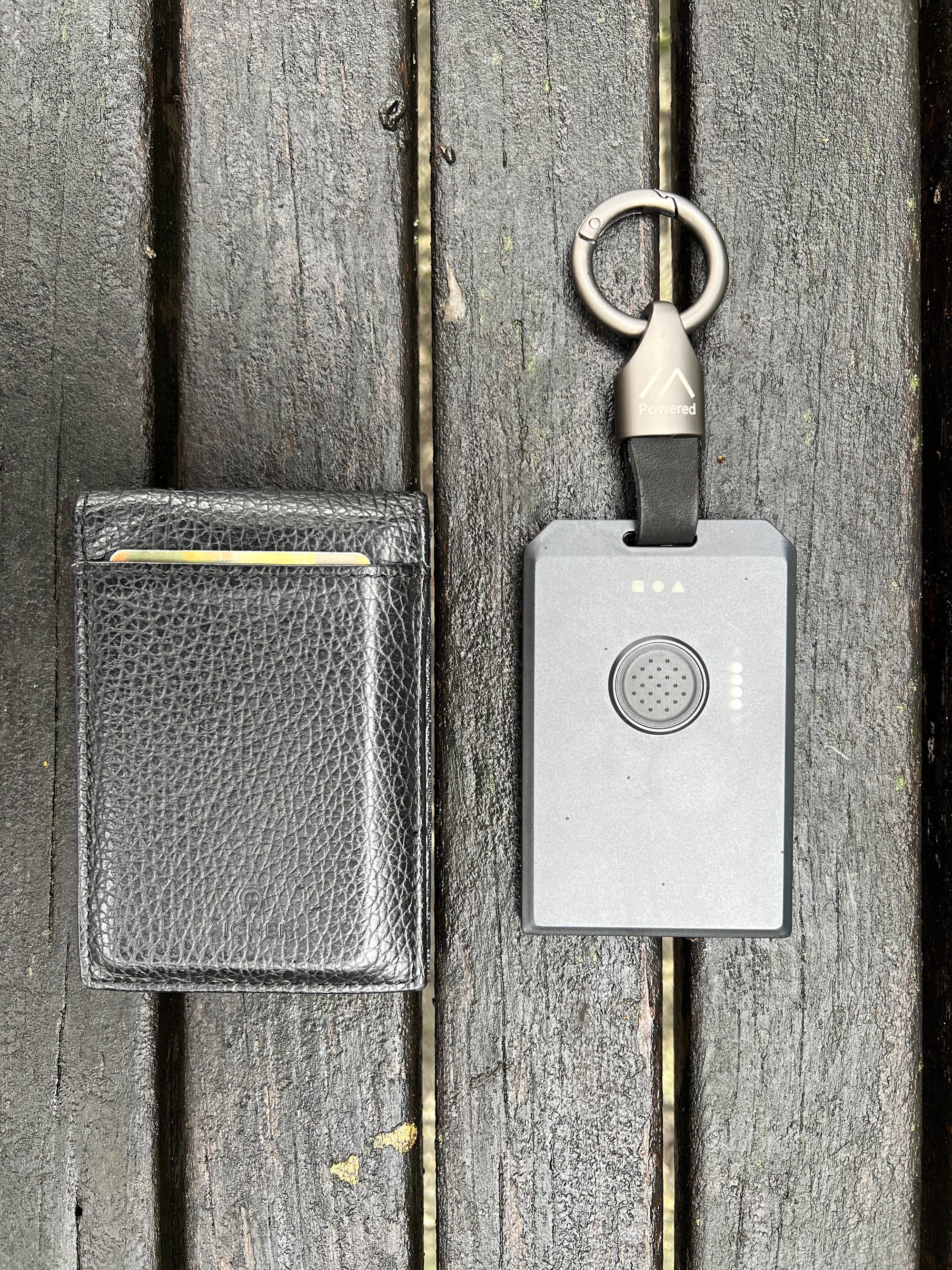
Dimensionally, the WisMesh Tag comes in at 92mm × 59mm with a 7.5mm thickness. For comparison the T1000-E is slightly smaller, but the WisMesh Tag is still absolutely pocketable and wearable with the included lanyard. The size increase is a fair trade for everything you're getting.
Hardware and Specs, What's Actually Inside
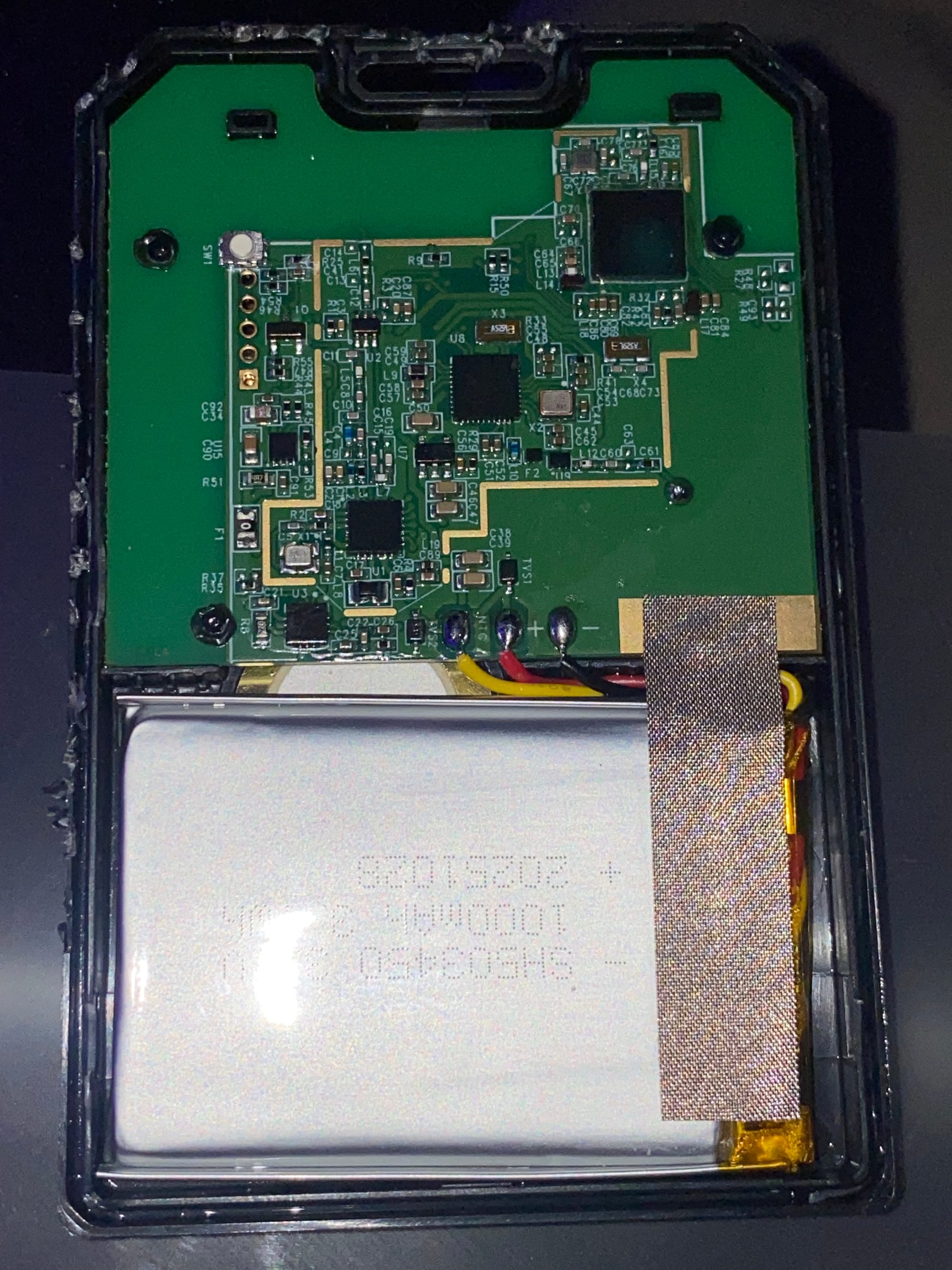
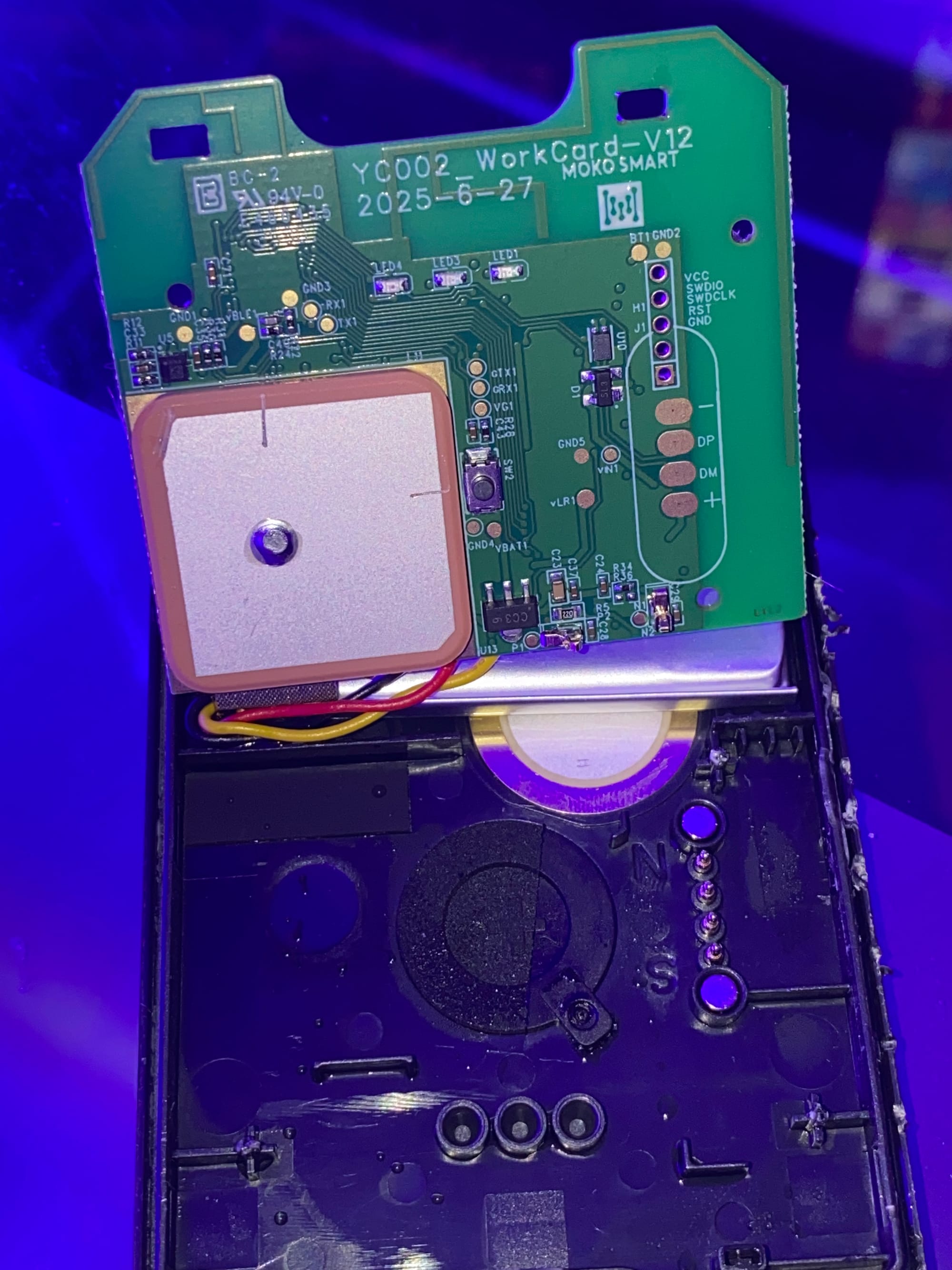
Let's talk about the internals, because the hardware decisions RAK made here are worth understanding.
The MCU is the nRF52840, the same chip used in some of the most power efficient Meshtastic devices on the market. It's power-efficient, Bluetooth 5.0 capable. Paired with it is the Semtech SX1262 LoRa transceiver, one of the best radio chips in the ecosystem, supporting both 8xx and 9xx MHz LoRa bands. For our testing we ran EU868, which covers most of Europe.
All antennas, LoRa, BLE, and GNSS, are internal. No external antenna sticking out, no connector to worry about breaking or losing. While yes you lost on customization like after market antenna for better gain or the ability to add sensors, this is not what the device intent use.
The form factor stays completely clean, which matters when you're carrying this thing clipped to your bag or running it through your jacket pocket every day.
Inside you also get a ST LIS2DH accelerometer. It's physically on the board and working, but Meshtastic firmware hasn't implemented support for it yet. This is worth keeping an eye on, when that support eventually lands, the Tag will be able to do motion-triggered position broadcasts, smart transmit behavior when stationary, and potentially significant battery life improvements for tracker use cases. It's future potential sitting on the board right now.
The GNSS chip is the AT6558R, supporting GPS, GLONASS, BeiDou, and Galileo, full multi-constellation. We'll get into what that means for real-world performance in the GPS section, because it's more nuanced than the specs suggest.
The buzzer is built in and hardware-level ready for Meshtastic notifications. We tested this thoroughly, more below.
The battery is 1000mAh. Coming from the T1000-E's 700mAh, this is a 43% increase in raw capacity, and the runtime difference in the real world is dramatic. More on that in the battery section.
Charging proprietary magnetic puck which is yes not the best if you lose it, but to keep the cost down while having water resistant features it is acceptable.
One aspect we couldn’t ignore is the GPS antenna. As you’ll see in the section below, GPS performance was solid but ultimately average, especially when compared to the more capable GNSS solution used in the T1000E. It’s not bad by any means, it performs reliably, but it doesn’t quite reach the same level.
In theory, using a higher-end GNSS chip similar to the one in the T1000E might have improved positioning performance, possibly even while optimizing internal space if paired with proper PCB antenna. However, that would almost certainly have increased the overall cost.
With that said, it’s still impressive how much functionality RAK managed to integrate into this compact form factor.
Button Controls
The front button is firmware-controlled and the behavior is clean and logical:
- Single press: Dismisses notifications
- Double press: Sends the device's position immediately
- Triple press: Toggles GPS on or off
- Long press: Shuts down the device
The back buttons handle reset and DFU, which as mentioned above is one of the best design decisions on this device. If you're coming from any other compact Meshtastic device, you will immediately appreciate not having to do the charger disconnect dance to flash firmware.
Setup and Pairing
Out of the box, setup was completely painless. Power on, open the Meshtastic app on your phone, go to Bluetooth, the WisMesh Tag showed up immediately, paired first try, no issues. Set your region, EU868 for us, and you're done. The pin is 123456 as the default pin for most devices without screen.
This is how it should work, and it did. Worth noting because not every device gets this right on the first pairing.
For anyone new to Meshtastic, the app is available on iOS and Android. Download it, pair, set region, and you're on the mesh.
Flashing Firmware
The WisMesh Tag ships pre-flashed with Meshtastic firmware and is ready to use out of the box. But if you want to update to a newer firmware version, or if you run into any issues, the process is actually one of the easiest in the entire Meshtastic ecosystem. Being nRF52840-based means no drivers, no esptool, no Python scripts. The chip appears as a plain USB storage drive and you copy a file onto it. That's it.
Web Flasher
The Meshtastic Web Flasher handles the firmware download and copy for you. You'll need Chrome or Edge, Firefox and Safari don't support the required Web USB/Serial APIs.
- Head to flasher.meshtastic.org in Chrome or Edge.
- Select RAK WisMesh Tag from the device list.
- Choose your firmware version, stable is recommended unless you know you need a beta build.
- Click Flash.
- The flasher will prompt you to put the device into DFU mode. On the WisMesh Tag, double-press the dedicated DFU button on the back of the device. The green LED will start breathing, which confirms you're in BLE DFU mode, and a new drive will appear on your computer named something like
RAK4631BOOT. - Download the Flash Erase UF2 file and copy it to the DFU drive.
Do You Need to Erase First?
For a simple firmware update, no erase is needed, just copy the new UF2 and you're done. However, if you're upgrading from a significantly older firmware version and the device is behaving strangely or getting stuck in a crash loop after flashing, a factory erase before reflashing can help. The web flasher has a 🗑️ trash icon next to the flash button that handles this, clicking it will walk you through erasing the internal flash before the new firmware goes on.
Over-the-Air (OTA) Updates
The nRF52840 also supports OTA firmware updates over Bluetooth, which means you can update the WisMesh Tag wirelessly from your phone without ever touching a cable. This is particularly useful if your device is mounted somewhere inconvenient or if you just prefer to skip the cable entirely. The Meshtastic app handles this, navigate to device settings and look for the firmware update option when a new version is detected. OTA carries a slightly higher risk of failure than USB drag-and-drop, so if anything goes wrong, fall back to the USB method above.
LED Indicators and Buzzer
The three-LED system we already covered at the hardware level, but let's talk about the actual experience of using it day-to-day.
The dedicated blue message LED means you always know at a glance whether you've got a message. You're not interpreting blink patterns. You don't need to unlock your phone. Blue LED is on, you got a message. That's it. For a device you're wearing on a lanyard or clipped to a bag during a hike or event, that simplicity genuinely matters.
The buzzer is loud and clear, not a timid little vibration or a faint beep you'll miss in the field, but an actual audible alert that cuts through ambient noise. We tested it receiving messages in an outdoor environment and it was clearly audible without being obnoxious.
For reference, the T1000-E also has a buzzer, but the combination of the dedicated blue LED on the WisMesh Tag makes the overall notification experience meaningfully better.
Water Resistance
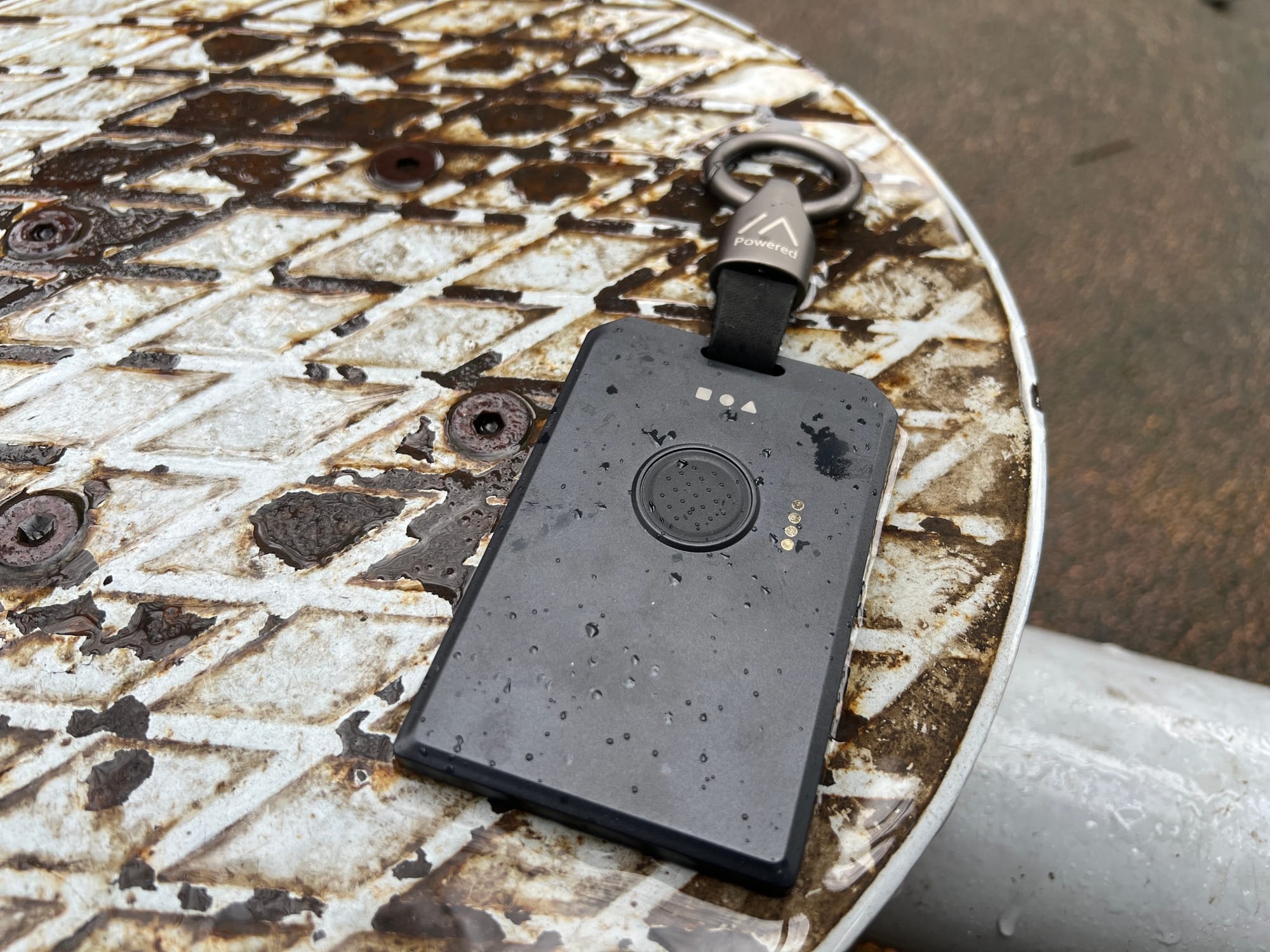
The T1000-E carries an IP65 rating. The WisMesh Tag is IP66, one step up, meaning it's rated to handle powerful water jets from any direction, not just rain splashing.
We didn't just trust the spec sheet. We ran the WisMesh Tag directly under running water, holding it under a tap for a solid test. After the test, the device was fully operational, LEDs working, button responsive, connected to the app without any issues. Zero concerns.
For real-world EDC use this means you can take it out in heavy rain, wash mud off it at a trailhead, or not panic if it goes through the wash in your jacket pocket. The IP66 rating is real, and it holds up.
Range Testing
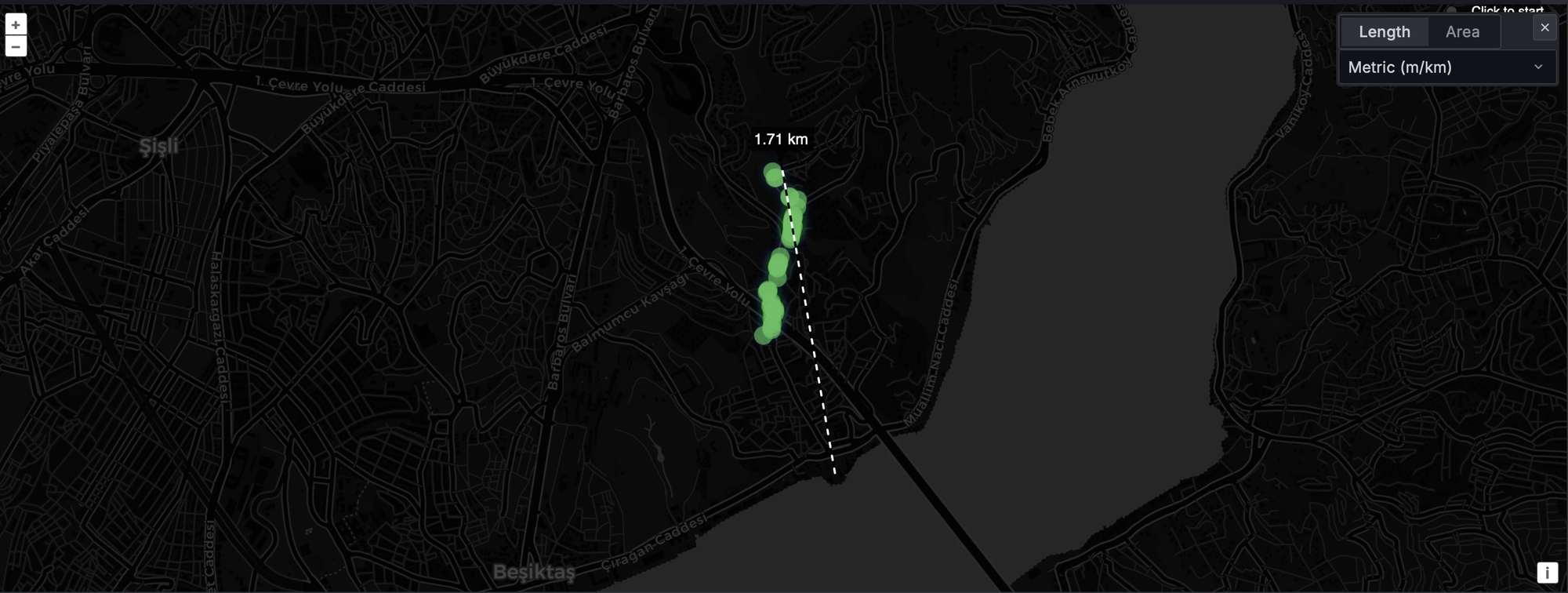
For range testing we set up the T1000-E as a fixed base station (as every other test we done) and walked with the WisMesh Tag. This is actually a meaningful setup because it lets us directly compare the Tag's radio performance against one of the best compact trackers in the ecosystem on the receiving end. If you can get acknowledgements from a T1000-E base station, you know the signal quality is solid.
We tested on EU868 in a dense urban environment, lots of buildings, significant interference, no clean line of sight for most of the route. These are hard conditions that genuinely stress-test the device.
The Tag reached 1.71 km before losing acknowledgements. That's the measured distance from the map trace. For context, that's right at the top of what we see from T1000-E units under similar conditions, and in some tests it edged ahead. But honestly, the distance number isn't the most important part of what we observed.
What stood out was the signal consistency and acknowledgement speed. ACKs came back fast, noticeably quicker and more reliably than we typically see across that distance with other devices. The signal felt strong throughout the route rather than just barely making it at the edges. There was no feeling of teetering on the edge of range and wondering whether the next packet was going to make it through. It just worked, cleanly, across the whole test corridor.
Battery Life, This Is the Big One
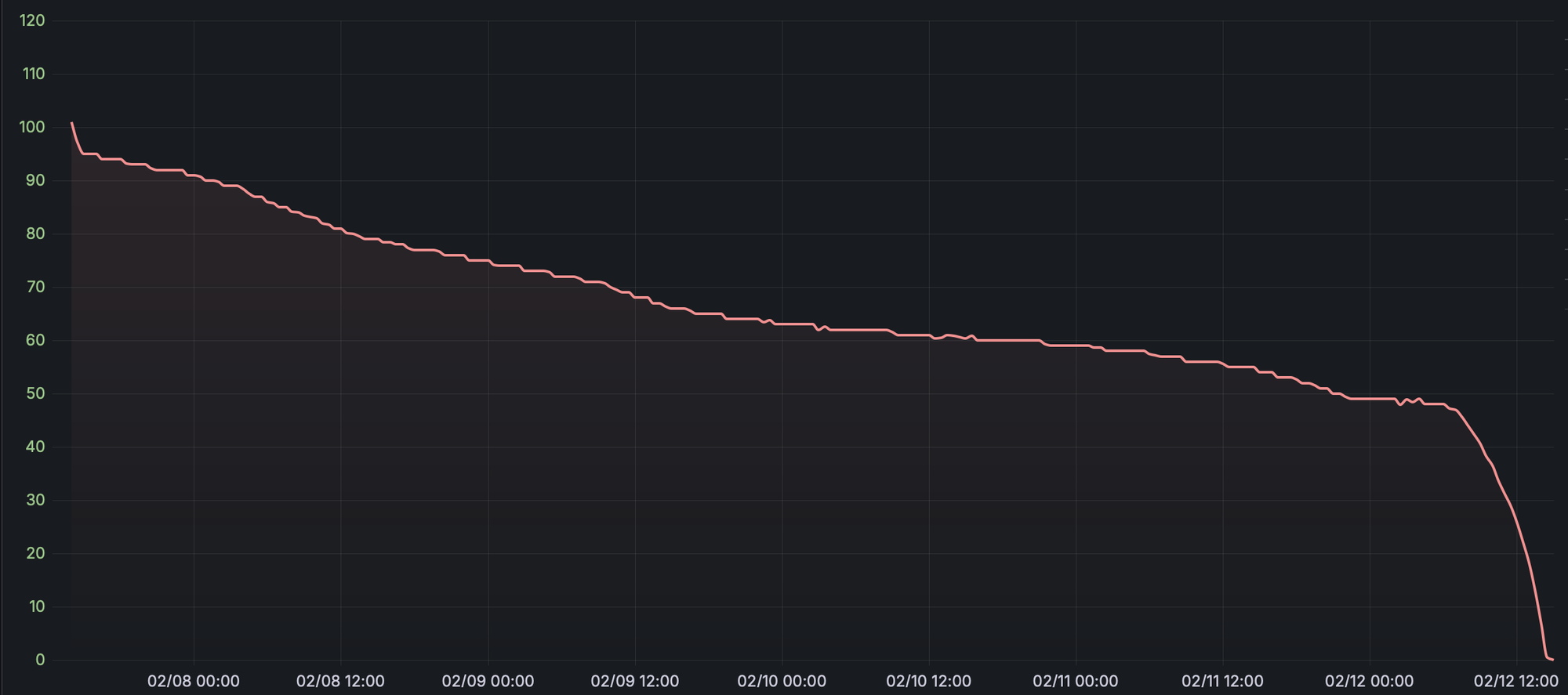
The T1000-E runs for about 3 days without GPS and telemetry active. The WisMesh Tag ran for 5 to 6 days in our testing without GPS. Five to six days. Which to be honest might not seems a like a big difference but it is like charging it 4 times a month vs charging it 8 times a month.
We actually reran the T1000-E battery tests after seeing this to make sure we weren't comparing against stale data. The gap is real. With 1000mAh vs 700mAh and an nRF52840 that's inherently power-efficient, the math works out and the real-world numbers reflect it.
To put this in practical terms: the T1000-E is a device you're thinking about charging every 2 days. The WisMesh Tag is a device you charge on Sunday and don't think about again until the following weekend. For an EDC device, that difference in mental overhead is significant. The best device is the one you actually have with you and charged, and the WisMesh Tag makes that dramatically easier.
GPS Performance
RAK's marketing positions the AT6558R as superior GPS performance compared to the T1000-E. On paper, the multi-constellation support (GPS + GLONASS + BeiDou + Galileo) should be a meaningful advantage, more satellite systems means more satellites in view, faster locks, better positioning in challenging environments. If you want to understand exactly why satellite count matters and what it actually means for positioning quality, we broke all of that down in our GNSS deep dive.
 Adrelien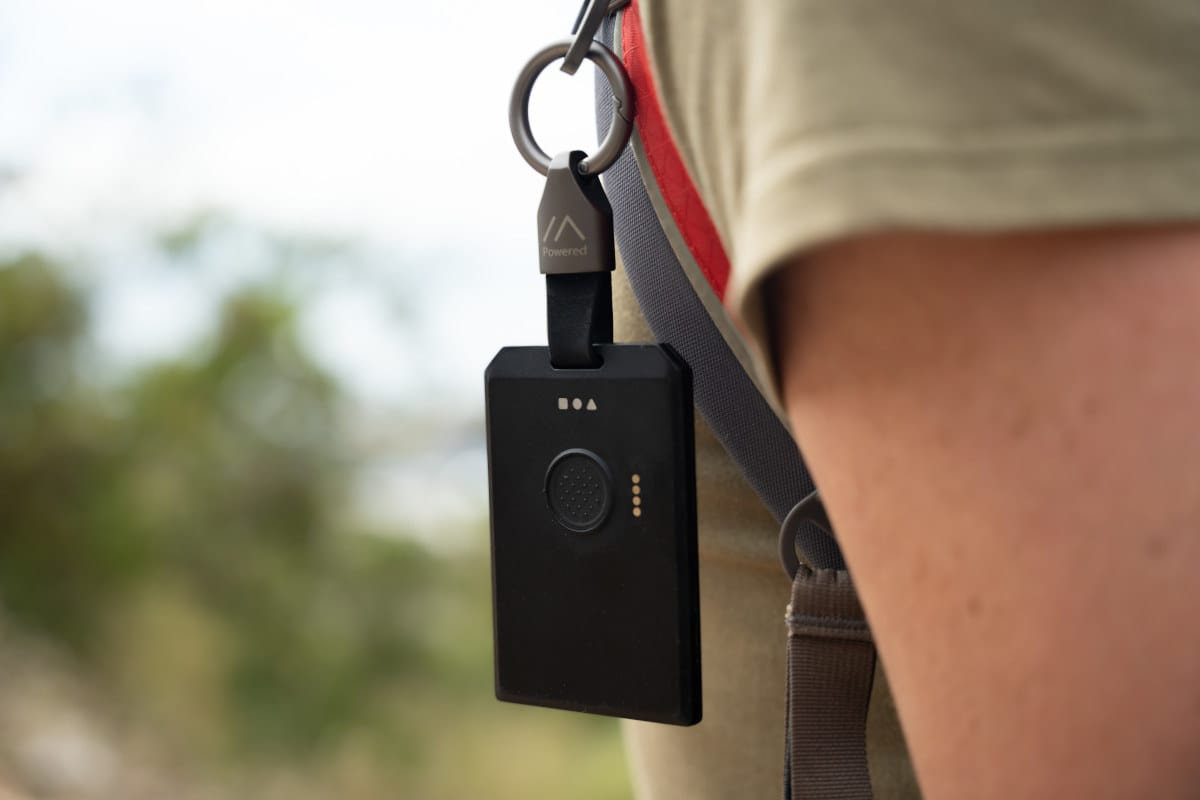
In our real-world testing, the results were more nuanced than the spec sheets might suggest. We tested both devices in an urban environment with dense buildings and limited sky visibility.
The WisMesh Tag, which uses the AT6558R single-band (L1) GNSS chip, locked onto 8 satellites under these conditions.
The SenseCAP T1000-E, powered by the MediaTek/Airoha AG3335 dual-band (L1 + L5) GNSS chip, acquired 11 satellites when tested in the same location and time window.
This result is not entirely surprising when you consider the hardware differences. The AT6558R supports multiple constellations (GPS, BeiDou, GLONASS, Galileo), but it operates on a single frequency band (L1). In contrast, the AG3335 supports multi-constellation reception across dual frequencies (L1 + L5), which improves signal robustness, especially in urban environments where multipath reflections and signal attenuation are common.
That said, satellite count alone does not tell the whole story. Real-world performance is influenced by antenna quality, RF layout, firmware configuration, and how aggressively the chipset filters weak or reflected signals. However, in our urban test scenario with partial sky view, the T1000-E’s AG3335 demonstrated stronger satellite acquisition based on total satellites tracked.
Does 8 satellites vs 11 satellites matter for typical tracker use? For basic position reporting across a Meshtastic mesh, probably not. Your position is going to resolve just fine at 8 satellites. But for lock reliability in tighter sky conditions, for first-fix speed, and for positioning stability when you're moving through urban canyons, more satellites does help. The T1000-E has a real edge here, at least under the conditions we tested.
It's also worth noting that multi-constellation chips sometimes need specific firmware configuration to fully activate all systems, this is something to watch as Meshtastic firmware development continues. The potential is there in the hardware.
Telemetry, What's There, What's Not
The WisMesh Tag doesn't include a temperature sensor, and there's no humidity sensor either. The T1000-E has basic temperature telemetry. If you're using your EDC device to also pull environmental data from the mesh, temperature readings, basic weather monitoring, the WisMesh Tag won't do that.
For a pure tracker and communication device, this doesn't matter at all. But if telemetry is part of why you carry a node, it's worth knowing before you buy.
The accelerometer (ST LIS2DH) is on the board but not currently usable in Meshtastic. When firmware support eventually lands, the Tag gains the ability to do smart position broadcasting, transmit only when moving, sleep more aggressively when stationary, which would be a meaningful update for tracker use cases.
Pricing & Value
Both devices sit at $39.00. Same number on the checkout page. But paying the same price for two devices doesn't mean you're getting the same value, it means you need to think harder about what that money is actually buying you, because these two devices make very different bets with it.
What the T1000-E gives you for $39
The T1000-E is 85mm × 55mm × 7mm. It is genuinely credit-card sized in your hand. It has an IP65 rating, a 700mAh battery, a single green LED, a magnetic puck charger, a temperature sensor, and a buzzer. The magnetic charger is proprietary, lose it and you're in trouble until a replacement arrives. The single LED does everything, which means you're decoding blink patterns to figure out whether you're looking at a charging state, a message notification, or a heartbeat. DFU mode requires a specific button-plus-charger disconnection sequence that has frustrated basically everyone who's had to do it more than once. Range in real-world urban conditions lands around 1.7–1.8km. GPS acquisition sits at around 11 satellites in our urban tests, which is strong. Battery runs 2–3 days without GPS. Firmware is mature, GPS performance is proven, and it works reliably out of the box.
At $39, the T1000-E is a well-rounded device that earns every dollar. It has been the recommendation for EDC Meshtastic device for good reason, and we're not here to pretend otherwise. But understanding what $39 gets you on the T1000-E makes it easier to see what changes when you spend that same $39 on the WisMesh Tag.
What the WisMesh Tag gives you for $39
The WisMesh Tag is 92mm × 59mm × 7.5mm, slightly larger, but still absolutely pocketable and wearable with the included lanyard. The IP66 rating is a step up. The battery is 1000mAh, a 43% increase in raw capacity that translates directly into 5–6 days of real-world runtime, nearly double what the T1000-E delivers. You get three dedicated LEDs instead of one, each with a single unambiguous job. The magnetic charger is proprietary, same story lose it and you're in trouble until a replacement arrives. The main button has a textured surface designed for confident one-handed interaction. There are dedicated reset and DFU buttons on the back. A buzzer is built in. A lanyard is included in the box. Build quality is the best we've seen on any compact Meshtastic device.
What you give up: the temperature sensor is gone. GPS satellite acquisition in our urban tests came in at 8 vs the T1000-E's 11. The device is slightly larger.
The honest breakdown
Let's be direct about the trade-offs, because they're real on both sides.
The T1000-E wins on GPS satellite acquisition and has a temperature sensor the WisMesh Tag doesn't. If you're using your EDC device to pull environmental telemetry, or if you're in an application where GPS precision under partial sky conditions is critical, the T1000-E is the better tool right now.
The WisMesh Tag wins on almost everything else. Battery life isn't close, 5–6 days vs 2–3 days is a meaningful difference in practice, not a marginal one. Build quality is very close. The notification experience with three dedicated LEDs and a buzzer is meaningfully better. The dedicated DFU and reset buttons are better. The included lanyard is a nice addition that shows RAK thought about the use case.
Here's the key question: what do you actually care about day-to-day when carrying a Meshtastic device? For most people, the answer is: charge it less often. The WisMesh Tag is the better device for that use case, and it costs the same.
Final Verdict
The WisMesh Tag is the best-built compact Meshtastic device available right now. It's not a close call on build quality, it's genuinely in a different league. The IP66 rating holds up in real testing. The three-LED system makes daily interaction clean and obvious. The dedicated reset/DFU button is very well thought addition. The buzzer works great. Battery life is nearly double what you get from the T1000-E. Pairing was instant. Range is right at the top of its class and signal consistency is excellent.
The GPS comes up slightly short of the T1000-E in satellite acquisition under urban conditions, and there's no temperature telemetry. Those are real trade-offs and we're not going to pretend otherwise.
But if you're buying a compact Meshtastic device in 2026 and your priorities are build quality, battery life, notification experience, and field reliability, the WisMesh Tag is the one to get. It's the same price as the T1000-E, and it wins on most of what matters for everyday carry.
Questions about the WisMesh Tag or want to see a specific test we didn't cover? Drop them in the comments.