Why Your Meshtastic Node Sees More Satellites (GNSS Explained)
Why does your node see 12 satellites while your friend’s sees 6? It isn't luck, it's GNSS. We break down hardware differences (UBlox vs. MediaTek), atomic timing, and why relying on just "GPS" is a mistake. Learn how multi-constellation support means faster locks and a stronger mesh.
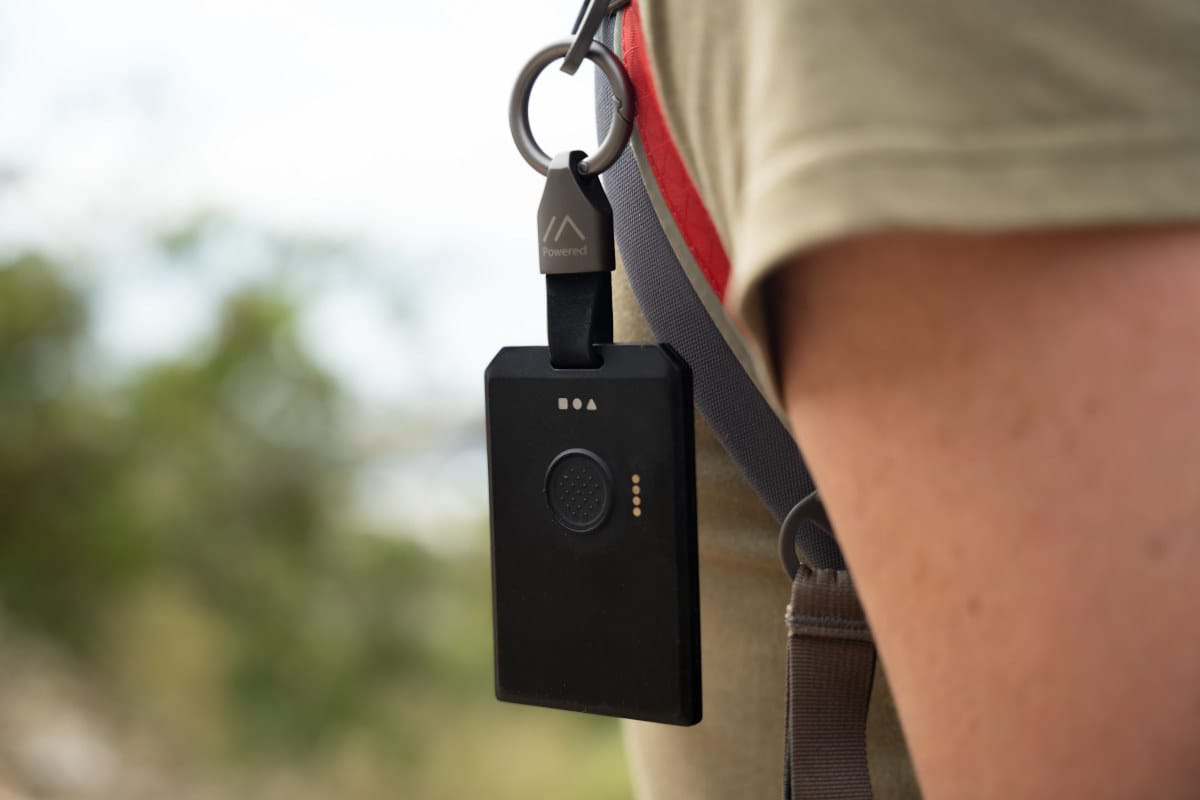
The other day we were scrolling through r/meshtastic and someone asks: "Why does my device show 10+ satellites in view while my buddy's barely sees 8?" Good question. Really good question, actually. And it's about to take us down a rabbit hole that involves atomic clocks, Cold War competition, European independence, and why your Meshtastic node cares about all of this.
Most people call it "GPS" because that's what we grew up with. But here's the thing: GPS is just one piece of a much bigger puzzle called GNSS. It's like how people say "Google it" when they mean "search the web", GPS became the catch-all term for satellite navigation, even though there are now six different systems orbiting Earth doing the exact same thing.
Buckle up. We're about to explain GNSS (and why it's not just "GPS"), how your location gets calculated to within meters, how, and why time synchronization is so important, and whether more satellite systems actually means better performance for your off-grid adventures.
What Even Is GNSS? (And Why Vendors List More Than One System When You're Shopping)
Let's start with the basics. You know when you're shopping for a Meshtastic device and the vendor specs say something like:
"GPS/GLONASS/Galileo/BeiDou/NavIC/QZSS support"
That's not marketing fluff. Those are six different satellite constellation systems orbiting Earth right now, and if you want to use your device as a serious tracker or care about fast GPS locks and accuracy, you should absolutely look for this in the specs. A lot of vendors don't even mention it, so you need to dig into the GPS chip model to figure out what you're actually getting.
GNSS stands for Global Navigation Satellite System. It's the umbrella term for any satellite-based navigation system. GPS is just one flavor of GNSS, specifically, the one run by the United States. But since GPS was first and dominated for decades, everyone just calls it "GPS" even when they're using five different systems at once.
Think of it this way:
- GNSS = "search engine"
- GPS = "Google"
- GLONASS = "Yandex"
- Galileo = "DuckDuckGo"
- BeiDou = "Baidu"
They all do the same job (help you figure out where you are), but they're run by different countries, use different satellites, and have slightly different strengths.
The Big Players: A Quick Rundown
Here's who's who in the satellite navigation game:
| System | Country/Region | Satellites | Status | Coverage |
|---|---|---|---|---|
| GPS | United States | 31 active | Fully operational since 1995 | Global |
| GLONASS | Russia | 24 active | Fully operational since 1995 | Global |
| Galileo | European Union | 30 active | Fully operational since 2016 | Global |
| BeiDou | China | 35+ active | Fully operational since 2020 | Global |
| NavIC | India | 7 active | Regional (2016) | India + 1,500km radius |
| QZSS | Japan | 7 active | Regional augmentation | Asia-Pacific |
Want to see which satellites are above you right now? Check out gnssplanning.com, it's a killer tool that shows you exactly which satellites from which systems are visible at your location. Just plug in your coordinates and time, and you can see GPS, GLONASS, Galileo, BeiDou, and QZSS satellites in real-time. Super useful for planning outdoor trips or troubleshooting why your node isn't getting a good fix.
Why Do Countries Build Their Own Satellite Systems? (Spoiler: Politics)
You might be wondering: "If GPS works fine, why did Europe, Russia, and China spend billions building their own systems?"
Great question. The answer is basically: "We don't trust the United States to not turn GPS off during a war."
No, really. That's it.
The GPS Story
GPS was originally a military project. The U.S. Department of Defense launched it in the 1970s-80s for missile guidance and troop coordination. For a long time, civilian GPS was deliberately degraded, meaning the military had access to accurate positioning (~1 meter), while civilian devices got a deliberately fuzzy signal (~100 meters). This was called "Selective Availability" and it lasted until 2000.
Even after the U.S. turned off Selective Availability, other countries got nervous. What if, during a conflict, the U.S. decided to shut off GPS entirely? Or degrade it again? Suddenly your entire economy, shipping, aviation, agriculture, grinds to a halt.
So Russia kept GLONASS (originally built during the Soviet era). Europe built Galileo. China built BeiDou. India built NavIC. Japan enhanced GPS with QZSS.
The result? We now have redundancy. If one system goes down (or gets sabotaged), others can pick up the slack. And for Meshtastic users, this means more satellites = better position fixes.
How Does Your Meshtastic Node Actually Know Where It Is?
Alright, time for the technical magic. How does a chunk of silicon the size of a fingernail figure out that you're standing at 35.6762°N, 139.6503°E (hello from Tokyo)?
The answer: trilateration + atomic clocks + really fast math.
Step 1: Satellites Scream Their Position at You
Every GNSS satellite constantly broadcasts two pieces of information:
- "Here's exactly where I am right now" (orbital parameters)
- "Here's the exact time, according to my onboard atomic clock" (timestamp)
These satellites have crazy-accurate atomic clocks that drift by only 1 nanosecond per day. (A regular quartz watch drifts by about 15 seconds per day, for comparison.)
Step 2: Your Receiver Measures the Time Delay
When your Meshtastic node's GPS chip receives a signal from a satellite, it does this calculation:
Distance = (Signal Travel Time) × (Speed of Light)
Radio waves travel at the speed of light (~300,000 km/s). So if a signal takes 0.07 seconds to reach you from a satellite, you know you're about 21,000 kilometers away from that satellite.
But here's the problem: knowing you're 21,000 km from one satellite doesn't tell you much. You could be anywhere on a sphere with a 21,000 km radius around that satellite.
So you need more satellites.
Step 3: Trilateration (Not Triangulation!)
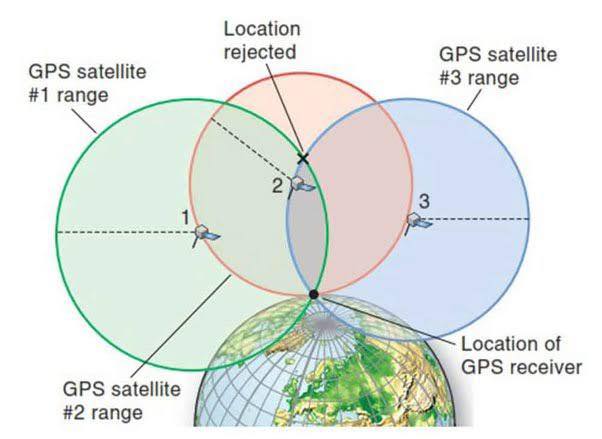
- With 1 satellite: You're somewhere on a sphere around it.
- With 2 satellites: You're somewhere on the circle where two spheres intersect.
- With 3 satellites: You're at one of two points where three spheres intersect.
- With 4 satellites: You get a precise 3D position (latitude, longitude, altitude).
Why 4 satellites minimum? Because your Meshtastic node doesn't keep time, some have RTC but that is topic for another day. The 4th satellite is used to correct for the clock error in your receiver.
 Adrelien
The Math (For Nerds Only)
If you want to geek out, here's the actual equation your GPS chip is solving:
√[(X - X₁)² + (Y - Y₁)² + (Z - Z₁)²] = c(t - t₁)
Where:
(X, Y, Z)= Your unknown position(X₁, Y₁, Z₁)= Satellite positionc= Speed of lightt= Your receiver's timet₁= Satellite's transmission time
Your GPS chip solves this equation simultaneously for 4+ satellites, every second, in real-time. Pretty wild, right?
How Meshtastic Gets Time From Satellites (And Why It Matters)
Here's something most people don't realize: Your Meshtastic network needs accurate time just as much as it needs accurate position.
Why Time Sync Matters for Mesh Networks
Meshtastic uses LoRa, which is a time-slotted protocol. Nodes need to know:
- When to transmit
- When to listen
- How to avoid collisions with other nodes
- How to timestamp messages for routing
If nodes have wildly different clocks, the mesh falls apart. Messages collide. Routing gets confused. Chaos.
How GNSS Provides Time
Every GNSS satellite has an onboard atomic clock synchronized to an incredibly precise timescale:
- GPS Time (maintained by the U.S. Naval Observatory)
- GLONASS Time (maintained by Russia)
- Galileo System Time (maintained by ESA)
- BeiDou Time (maintained by China)
These timescales are synchronized to within nanoseconds of each other.
When your Meshtastic node locks onto satellites, it's not just getting position—it's getting ultra-precise time. This gets distributed across the mesh network, keeping all nodes in sync.
Practical example: Let's say you're hiking with 10 friends, all with Meshtastic nodes. Only one person needs GPS. That node can act as the "time authority" for the entire mesh, broadcasting time updates to everyone else. The other nodes can turn off their GPS to save battery.
Breaking Down the Systems: GPS vs GLONASS vs Galileo vs BeiDou
Now let's talk specifics. What makes each GNSS constellation different? And does it matter for your Meshtastic setup?
GPS (United States)
Launch: 1978 (fully operational 1995)
Satellites: 31 active (24 minimum required)
Orbit: Medium Earth Orbit (MEO), ~20,180 km altitude
Accuracy: ~5-10 meters (civilian), ~1-2 meters (military)
Frequency Bands: L1 (1575.42 MHz), L2, L5
Strengths:
- Most mature system with best global coverage
- Widest device support (every GPS chip supports it)
- Extensive ground control network
- Free, no usage fees
Weaknesses:
- U.S. controls it—could be degraded or shut off
- Older satellites may have less accurate clocks
- Not as many satellites as BeiDou
For Meshtastic Users:
- If your device only has GPS, you're still fine. It's the gold standard.
- Cold start can take 30+ seconds to acquire fix
GLONASS (Russia)
Launch: 1982 (fully operational 1995)
Satellites: 24 active
Orbit: MEO, ~19,130 km altitude
Accuracy: ~5-10 meters
Frequency Bands: L1 (1602 MHz), L2 (1246 MHz)
Strengths:
- Better coverage at high latitudes (like Alaska, Scandinavia, Russia)
- Uses FDMA instead of CDMA (different signal structure)
- Independent from U.S. control
Weaknesses:
- Slightly less accurate than GPS/Galileo
- Satellites wear out faster (shorter lifespan)
- Uses more power in receivers
For Meshtastic Users:
- GPS + GLONASS combo significantly improves fix speed
- Great if you're hiking in northern latitudes
- Drains battery ~10-15% faster than GPS alone
Galileo (European Union)
Launch: 2011 (fully operational 2016)
Satellites: 30 active
Orbit: MEO, ~23,222 km altitude (highest orbit of all)
Accuracy: ~1 meter (free service), ~0.01 meters (commercial)
Frequency Bands: E1 (1575.42 MHz), E5a, E5b, E6
Strengths:
- Most accurate civilian system (better than GPS!)
- Better signal penetration (useful in forests/urban areas)
- Built for civilian use from the ground up
- Search and Rescue (SAR) service built-in
Weaknesses:
- Newest system, still building out
- Not as widely supported in older chips
- EU control (less relevant for most users)
For Meshtastic Users:
- If your device has Galileo support, use it
- Noticeably faster time-to-first-fix (TTFF)
- Best for urban/forest environments
BeiDou (China)
Launch: 2000 (BeiDou-1), fully global 2020 (BeiDou-3)
Satellites: 35+ active (most of any system!)
Orbit: Mixed—MEO, IGSO, and GEO satellites
Accuracy: ~5-10 meters (free), ~0.1 meters (premium)
Frequency Bands: B1 (1561.098 MHz), B2, B3
Strengths:
- Most satellites in orbit (better availability)
- Excellent coverage in Asia-Pacific
- Two-way messaging feature (unique to BeiDou!)
- GEO satellites provide 24/7 coverage in some regions
Weaknesses:
- Mixed orbital types can complicate processing
- Not as accurate globally as Galileo
- China controls it (geopolitical concerns)
For Meshtastic Users:
- If you're in Asia, look for BeiDou
- The two-way messaging feature isn't accessible to consumer devices (yet)
- Great for improving satellite count in urban canyons
NavIC & QZSS (Regional Systems)
NavIC (India):
- 7 satellites covering India + 1,500 km radius
- Designed for regional sovereignty
- Not super useful unless you're in India
QZSS (Japan):
- 7 satellites augmenting GPS in Asia-Pacific
- Improves accuracy in Japan, Australia, Southeast Asia
- Works with GPS, not standalone
For Meshtastic Users:
- These are "nice to have" but not game-changers
- If your chip supports them, it is even better
So, Why Do Some Meshtastic Devices See More Satellites?
Back to the original question: Why do some Meshtastic devices show 10+ satellites while others might only see 8?
Reason 1: Different GPS Chips
This is the big one. Some devices use cheap GPS modules that only support GPS + GLONASS. Others use modern multi-GNSS chips that can track everything:
- Budget chips (like older NEO-6M modules): GPS + GLONASS only
- Mid-range chips (like ATGM336H): GPS + BeiDou
- Modern chips (like UBlox MAX-M10S, MediaTek AG3335): GPS + GLONASS + Galileo + BeiDou + QZSS
More supported systems = more satellites in view.
When you're shopping for a Meshtastic device, the GPS chip model matters way more than most people realize. A device with a MediaTek AG3335 or UBlox M10 will absolutely destroy a NEO-6M in terms of satellite count and accuracy.
Reason 2: Antenna Quality
High-end devices often come with ceramic patch antennas designed specifically for GNSS reception. Budget builds or DIY setups might use cheap external antennas with poor gain, or worse, no antenna optimization at all.
Better antenna = better signal reception = more satellites detected.
If you're serious about GPS performance, antenna quality matters almost as much as the chip itself. A great chip with a terrible antenna will still struggle.
Reason 3: Firmware Configuration
Some GPS modules need to be explicitly configured to enable multi-GNSS support. If your firmware only enables GPS, you won't see GLONASS/Galileo satellites even if the chip supports them.
Reason 4: Geographic Location
Depending on where you are on Earth, you'll see different satellites:
- Equatorial regions: See more MEO satellites from all systems
- Northern latitudes: GLONASS coverage improves
- Asia-Pacific: BeiDou dominates, QZSS helps
- Urban canyons: Need more satellites from more systems
The Performance Question: Is More Always Better?
You'd think having 30 satellites in view is better than 8. And generally, it is. But there are diminishing returns.
Satellite Visibility vs. Accuracy
| Satellites in View | Typical Accuracy |
|---|---|
| 4 satellites | ~15-30 meters |
| 6-8 satellites | ~5-10 meters |
| 10-15 satellites | ~3-5 meters |
| 20+ satellites | ~2-4 meters |
Notice how accuracy improvements drop off after ~10 satellites? That's because of two factors:
- Geometric Dilution of Precision (GDOP): Having satellites evenly distributed in the sky matters more than raw count. 8 well-spaced satellites beat 20 clustered satellites.
- Processing Overhead: Your GPS chip can only track a certain number of satellites simultaneously. More systems = more processing = more power draw.
Power Consumption Trade-offs
Enabling more GNSS systems uses more battery:
- GPS only: Baseline power consumption
- GPS + GLONASS: +10-15% power
- GPS + GLONASS + Galileo: +15-20% power
- GPS + GLONASS + Galileo + BeiDou: +20-30% power
For a battery-powered Meshtastic node on a multi-day hike, this matters.
Recommendation:
- For fixed/solar nodes: Enable everything. You have power to spare.
- For battery-powered handhelds: Focus on GPS + Galileo (best accuracy-per-watt).
- For ultra-low-power trackers: GPS is enough, with smart broadcast enabled.
Conclusion: More Satellites = More Better (Usually)
So, back to the original question: Why do some Meshtastic devices show more satellites?
Because they have better GPS chips with multi-GNSS support, better antenna design, and modern firmware that enables all available systems.
Does that make them better?
For most use cases, yes. More satellites means: faster initial fix, better accuracy, more resilience in challenging environments, and better mesh time sync.
But it comes at a cost: higher power consumption, more expensive hardware, and overkill for some applications
The sweet spot for most Meshtastic users: GPS + Galileo (best balance), smart broadcast enabled, external antenna for fixed nodes, and look for modern GPS chips when shopping (UBlox M10 series, MediaTek AG3335, etc.)
And remember: the whole point of Meshtastic is building resilient, off-grid communication networks. Having reliable positioning is part of that puzzle. Whether you're coordinating a hiking group, tracking assets, or building a disaster-ready mesh network, understanding GNSS (sorry, "GPS") helps you make better hardware and configuration choices.