LilyGO T-Lora Pager Review: Packed With Features You Can't Use Yet
NFC, an AI motion sensor, an audio codec, a fuel gauge, 2.4 GHz LoRa. The T-Lora Pager has more hardware than any Meshtastic device — and mesh firmware uses almost none of it. Here's what actually works.
Every Meshtastic handheld we've reviewed here has been a communication device first. The ThinkNode M1 is an e-paper messenger. The ThinkNode M2 is a tiny messenger. The Wio Tracker L1 Pro is a messenger with solar. Same idea each time: get a message in, get a message out, don't die on battery.
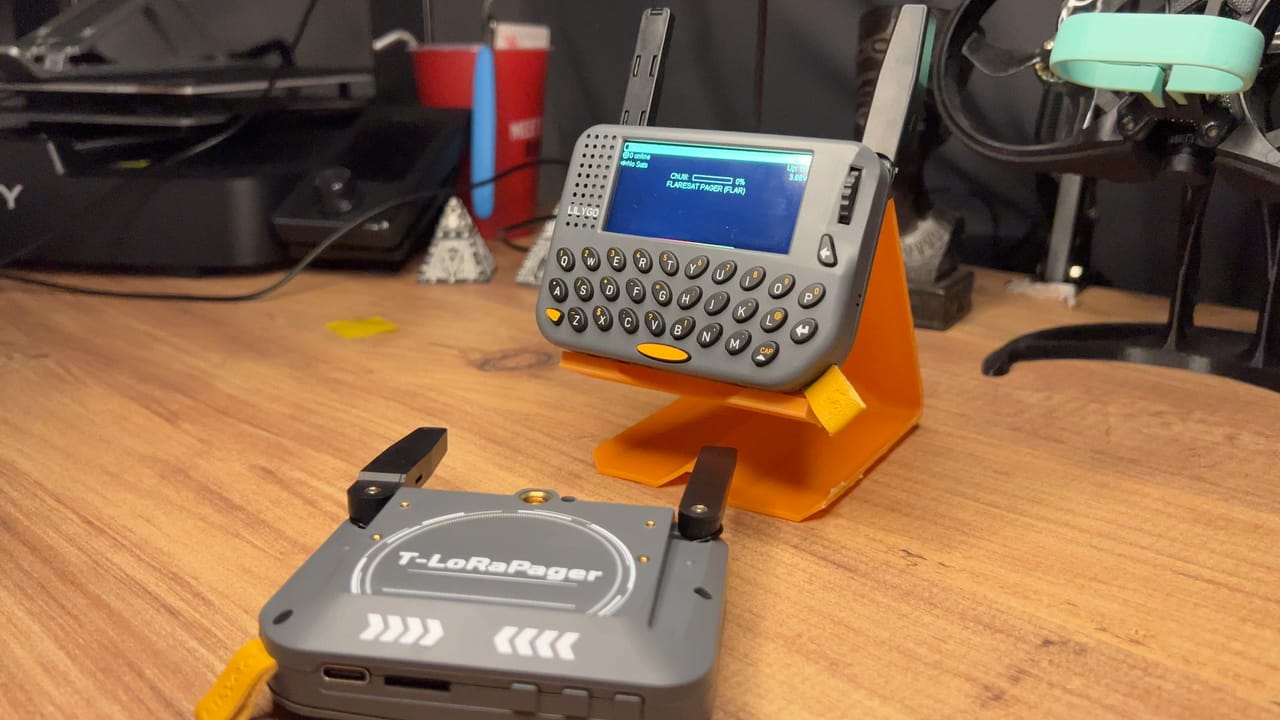
The T-Lora Pager is not that. It's a general-purpose ESP32-S3 handheld computer that happens to ship with a LoRa radio, and Meshtastic is one of several firmwares you can put on it. That distinction explains almost everything good and bad about this device.
Here's the short version, because it took a while to work out. This is the best-built object in the Meshtastic ecosystem, and it's running software that hasn't caught up to it. The shell is superb. The packaging is superb. The keyboard is backlit and genuinely good to type on. There's a speaker that plays proper notification tones, a haptic motor that fires on incoming messages, and you can send a message from the device without touching your phone.
And it currently sits at 2.0 stars on LILYGO's own store.
We've been running it, and we don't think the hardware is why. Let's get into it.
The Variant Maze, Read This Before You Buy
"T-Lora Pager" is not one product. It's one chassis with several different radios, and the radio decides what firmware you can run and which bands you get.
| Version | Radio | Bands |
|---|---|---|
| 433 / 868 / 915 / 920 MHz | Semtech SX1262 | One sub-GHz band, fixed at purchase |
| With LR1121 Module [K257-04] | Semtech LR1121 | 868 + 915 MHz + 2.4 GHz |
| CC1101 | TI CC1101 | Sub-GHz (G)MSK/FSK/OOK — not a mesh radio |
| SX1280 | Semtech SX1280 | 2.4 GHz only |
| 24L01 2.4G Shield [H780] | nRF24L01 | Add-on shield, not LoRa at all |
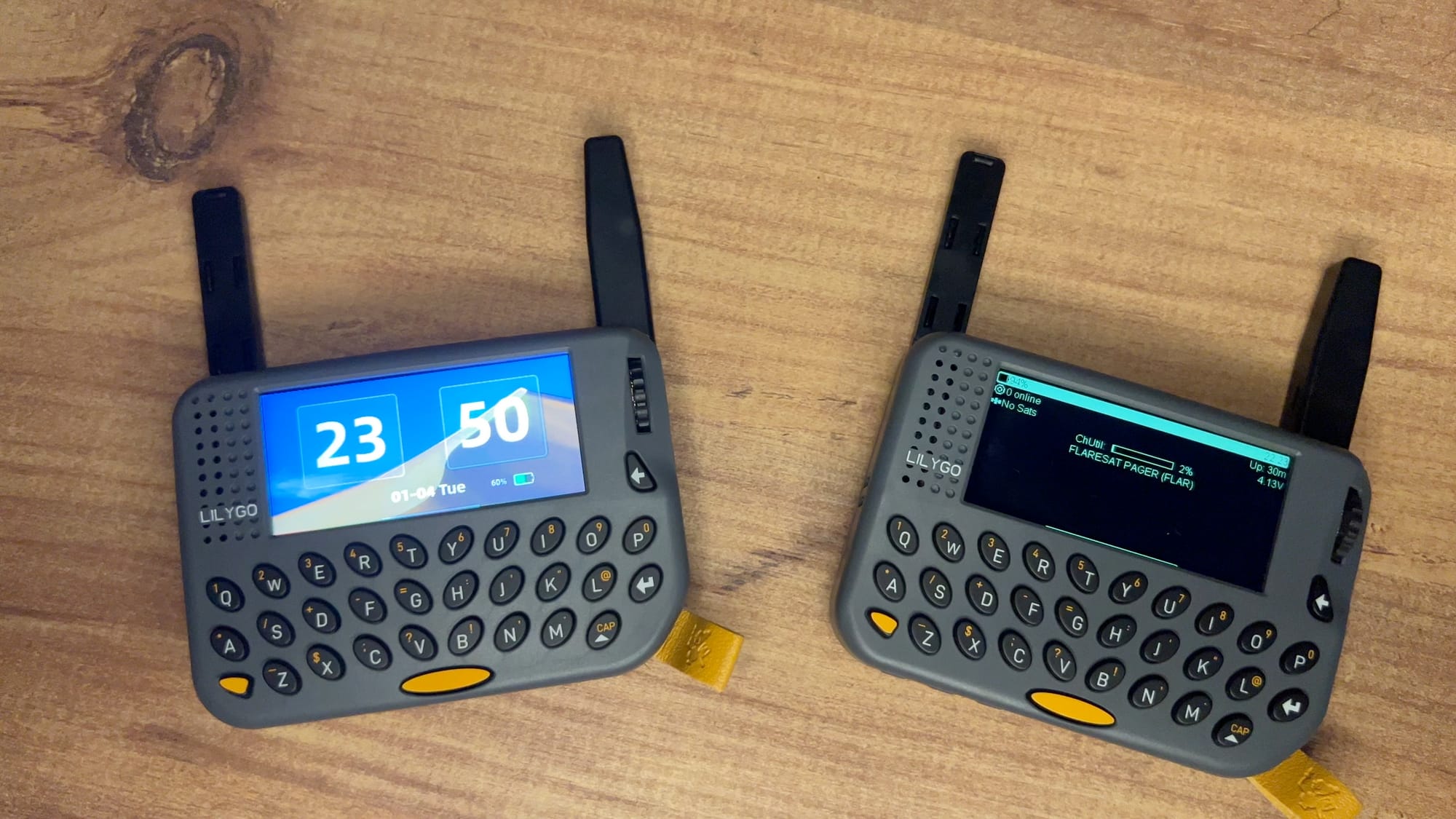
Our unit is the LR1121 version, running EU868. One sub-GHz antenna, and one 2.4 GHz. The SX1262 versions ship with one. If you're looking at a listing photo and counting antennas, you already know which board it is.
Unboxing and First Impressions
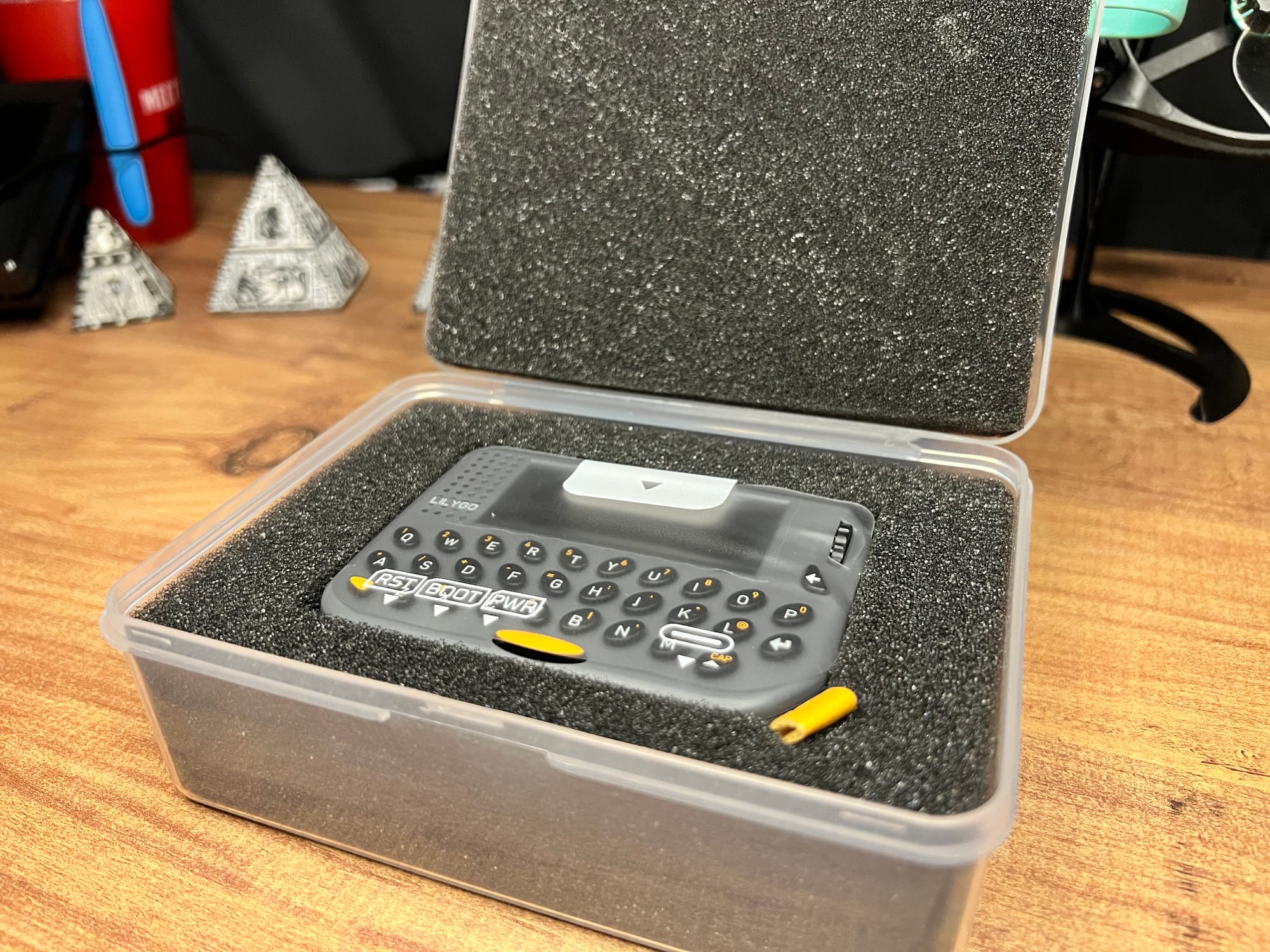
The packaging is the first sign this isn't a bare dev board with delusions. It arrives properly boxed with the device wrapped in protective plastic, closer to unboxing a phone than unboxing a maker board. LILYGO spent money here and it sets the tone.
Lift the two foam inserts and you'll find the extras hiding underneath: an NFC sticker and a set of pin headers for the expansion port. There's no printed manual, no USB cable in our box, and no lanyard. At $88 that is just not acceptable. In the box:
- T-Lora Pager (both antennas permanently attached, they swing out from the back)
- NFC sticker
- Pin headers for development
Build Quality
It's superior, and that's not a "good for the price" hedge. The shell is injection-moulded plastic and the quality of it is high, dense, solid, no creak and no flex when you squeeze it. The plastic doesn't hold fingerprints. It sits flat on a desk without rocking. Of every Meshtastic handheld we've handled, this is the nicest object, and it beats the ThinkNode M1, which we already called premium.
There's a leather tab on the device for clipping a carabiner, which is a nice touch, though no lanyard is included to use with it.
The screen is the other standout. It's a 2.33" IPS panel and the whole thing is usable, no dead border, no chin, the image runs to the edge of its window. It looks like glass. Sunlight readability is good; not flagship-phone good, but you can read it outside without shielding it. The viewing angles are wide enough that you'd be forgiven for guessing OLED. The one downside is that it's a proper fingerprint magnet, unlike the body.
The keyboard is excellent. We're saying this plainly because it contradicts what you'll read on LILYGO's store page, where several buyers report the spacebar working loose or popping off. Some people are clearly having that problem. Ours isn't. The keyboard feels really good, nothing is loose, and it's pleasant to type on.
The Antennas Are the One Real Build Complaint
You get two on the LR1121 version, tucked flat against the back, one on each side. Each swings out through 180 degrees like the hand of a clock, push it one way and it is out, push it back and it is tucked in.
They're flimsy. They don't hold position properly, and the whole action feels wobbly and cheap in a way nothing else on this device does. It's the one part that feels value-engineered, which is an odd place to save money given the foldable antenna design is the headline of LILYGO's own marketing.
The two are identical in length, and there's no marking on the device telling you which is which. Going by LILYGO's own product photography, the left one is the 2.4 GHz.
The device does still work with both antennas folded flat, which is useful to know for pocket carry.
The Buttons Are a Genuine Design Failure
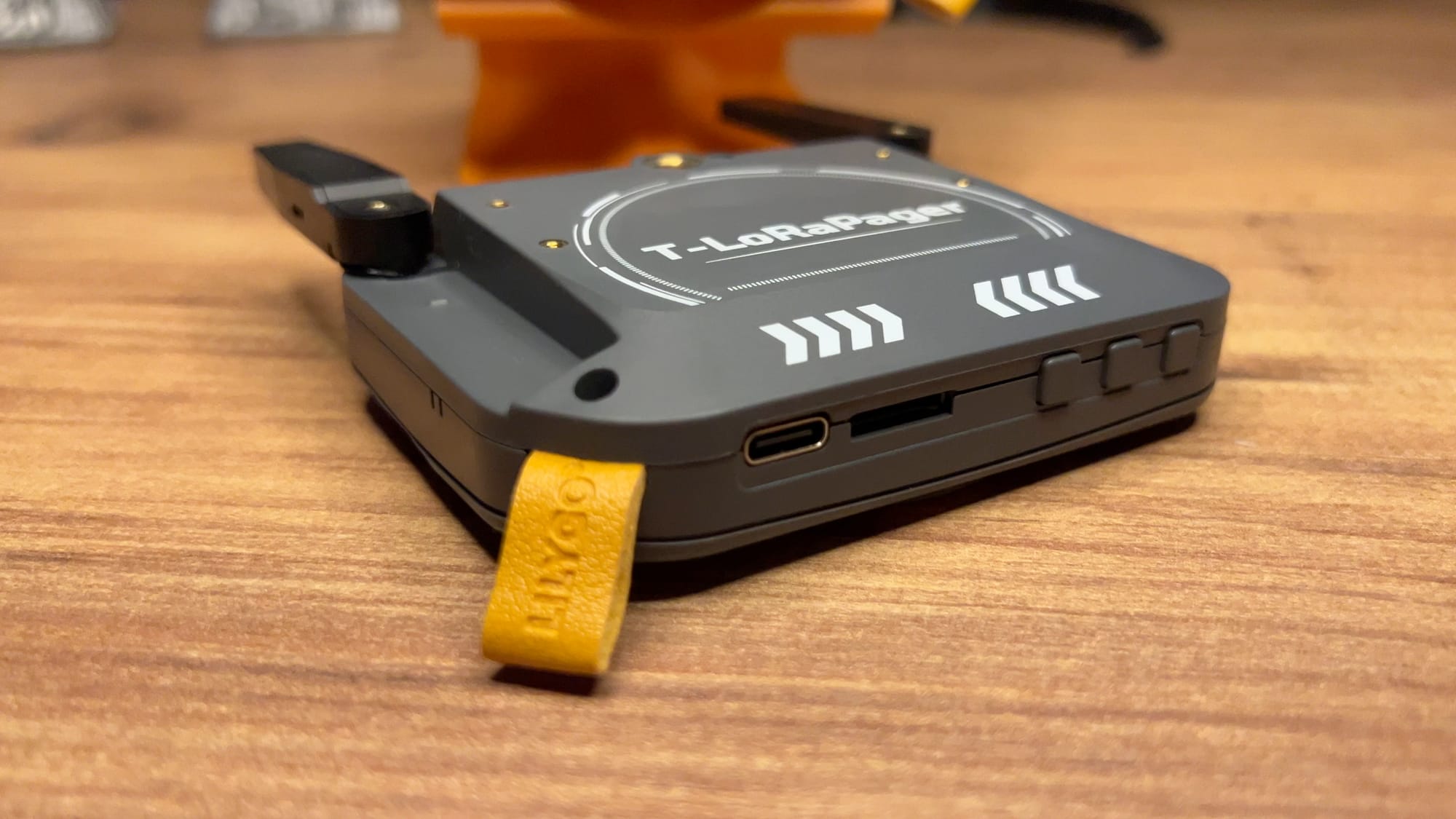
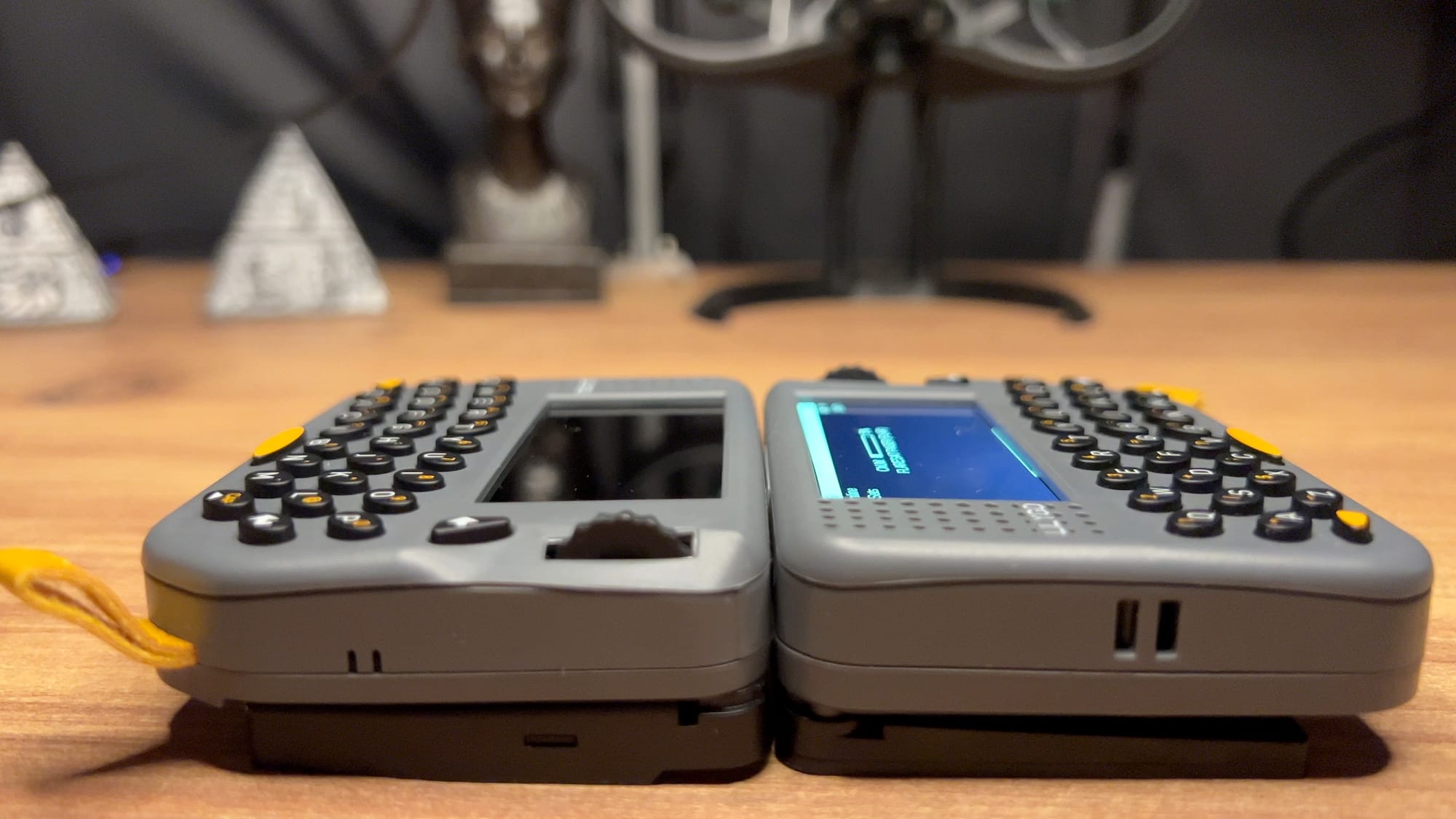
Three buttons on the bottom, none of them labelled. Working inward: the outer one is Reset, the middle is Boot, and the innermost is Power.
That order isn't intuitive, and it bites hardest exactly when you're already annoyed after flashing. The documented recovery is hold BOOT, tap RESET, release BOOT, which is hard to execute when you can't tell which is which. We repeatedly got the device stuck on reset or stuck in DFU and had to work through combinations blind.
The buttons are also stiff and oddly clicky, with no clean tactile confirmation, so you often can't tell whether a press registered and end up pressing harder than you should have to. On a device this well built, three unlabelled ambiguous buttons in a row feels like something nobody caught.
Powering off is part of the same story: it does fully power down rather than sleep, but only after a long press, and there's no feedback telling you it worked.
No Charge Indicator, Which Is a Bigger Deal Than It Sounds
Plug it in and nothing happens. No LED, no screen wake, no indication of any kind that the device is charging. It doesn't power on when you connect it either. You just have to trust it.
For what it's worth, charging is quick, roughly 45 minutes from flat to full — and the device doesn't get warm doing it. But on a device with this much attention to detail elsewhere, the missing charge LED is a genuine annoyance.
No Water Resistance
There's no IP rating. That's the norm rather than the exception, sealing something with a headphone jack, an SD slot, a speaker grille and two antenna hinges is hard and expensive. The ThinkNode M3 and MeshTracker X1 manage IP66 precisely because they have no ports, no screen and no moving parts.
It does sting slightly more here, though, because the case is openable, it's held together with screws, but the battery isn't designed to be user-swapped. A device that isn't sealed and also isn't easily serviceable is the worst of both worlds. If LILYGO ever does a v2, a pop-off back with a replaceable cell would be the single best change they could make.
Hardware and Specs, What's Actually Inside
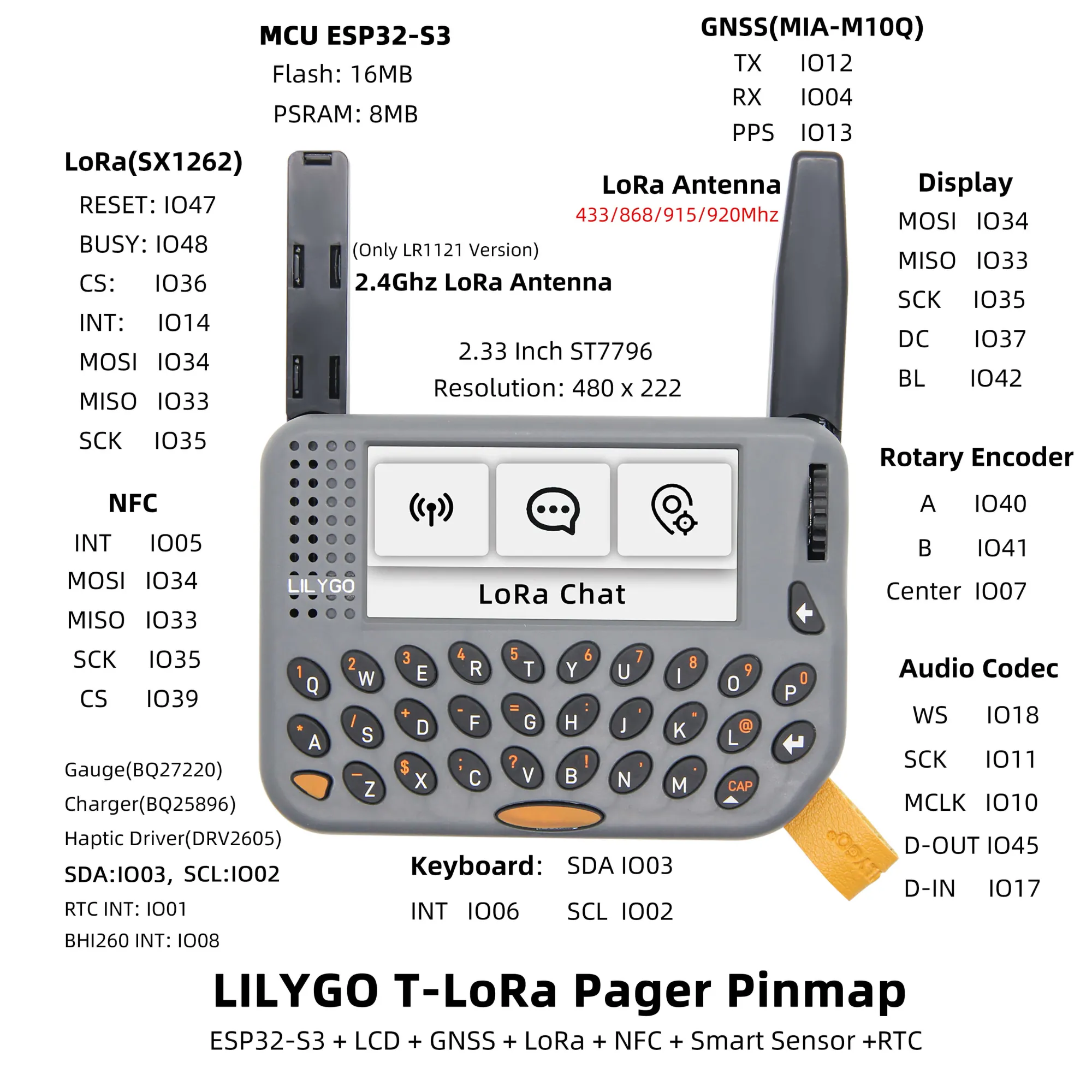
Open the spec sheet and this stops looking like a mesh radio.
MCU: ESP32-S3. Dual-core Xtensa LX7 at 240MHz, 16MB QSPI flash, 8MB QSPI PSRAM. Four times the flash of a ThinkNode M2, and the reason it can run a colour LVGL interface at all.
Display: 2.33" IPS, 480 × 222, ST7796, with an AW9364 16-level backlight driver. The widest aspect ratio on any Meshtastic handheld, roughly 2.16:1.
GNSS: u-blox MIA-M10Q. Four-constellation concurrent. A genuinely good receiver, the M10 series is a step above the budget GNSS you find at this price. Single-band L1. If you want the background on why constellation and band matter, we covered it here: Why Your Meshtastic Node Sees More Satellites.
IMU: Bosch BHI260AP. Not a plain accelerometer, a self-learning AI sensor hub with its own processor that can run activity recognition without waking the ESP32. In mesh firmware it's a wake-on-motion sensor. The interesting capability sits unused.
NFC: ST25R3916. Full reader/writer. Meshtastic does nothing with it, but the factory firmware does, and the included sticker reads fine.
Audio: ES8311 codec driving an Nsiway NS4150B 3W Class-D amp, a speaker, a microphone and a headphone jack.
Power: TI BQ25896 charger + TI BQ27220 fuel gauge. The BQ27220 is a coulomb-counting gas gauge, which in theory means an accurate battery percentage rather than the voltage-guessing most Meshtastic devices do. In practice, see below.
Haptics: TI DRV2605. A real haptic driver, and unlike the IMU and the NFC, mesh firmware actually uses it.
Also on board: NXP PCF85063A RTC, XL9555 GPIO expander, microSD slot (up to 32GB FAT32), rotary encoder with push-select, and a 2×8 2.54mm expansion header.
Specs at a Glance
| LilyGO T-Lora Pager | |
|---|---|
| MCU | ESP32-S3, dual-core LX7 @ 240MHz |
| Memory | 16MB Flash + 8MB PSRAM |
| LoRa | LR1121 (our unit) — also sold as SX1262 / CC1101 / SX1280 / SI4432 |
| Bands | 868 + 915 MHz + 2.4 GHz (LR1121) |
| Display | 2.33" IPS 480×222, ST7796, 16-level backlight |
| Input | 34-key backlit QWERTY + detented rotary encoder + 3 buttons |
| GNSS | u-blox MIA-M10Q, 4-constellation |
| IMU | Bosch BHI260AP (AI sensor hub) |
| NFC | ST ST25R3916 |
| Audio | ES8311 codec, NS4150B 3W amp, mic, speaker, 3.5mm jack |
| Battery | 1500mAh (5.55Wh) |
| Charge time | ~45 min, no charge indicator |
| Charger / Gauge | TI BQ25896 / TI BQ27220 |
| Haptics | TI DRV2605 (used by mesh firmware) |
| Storage | microSD up to 32GB (FAT32), not included |
| Expansion | 2×8 2.54mm header + shield connector |
| Mounting | 1/4" tripod thread + 4× M2 + leather tab |
| Ports | USB-C and microSD on the bottom, 3.5mm jack |
| Dimensions | 106 × 89 × 23 mm |
| Water resistance | None |
The Screen, Keyboard and Encoder
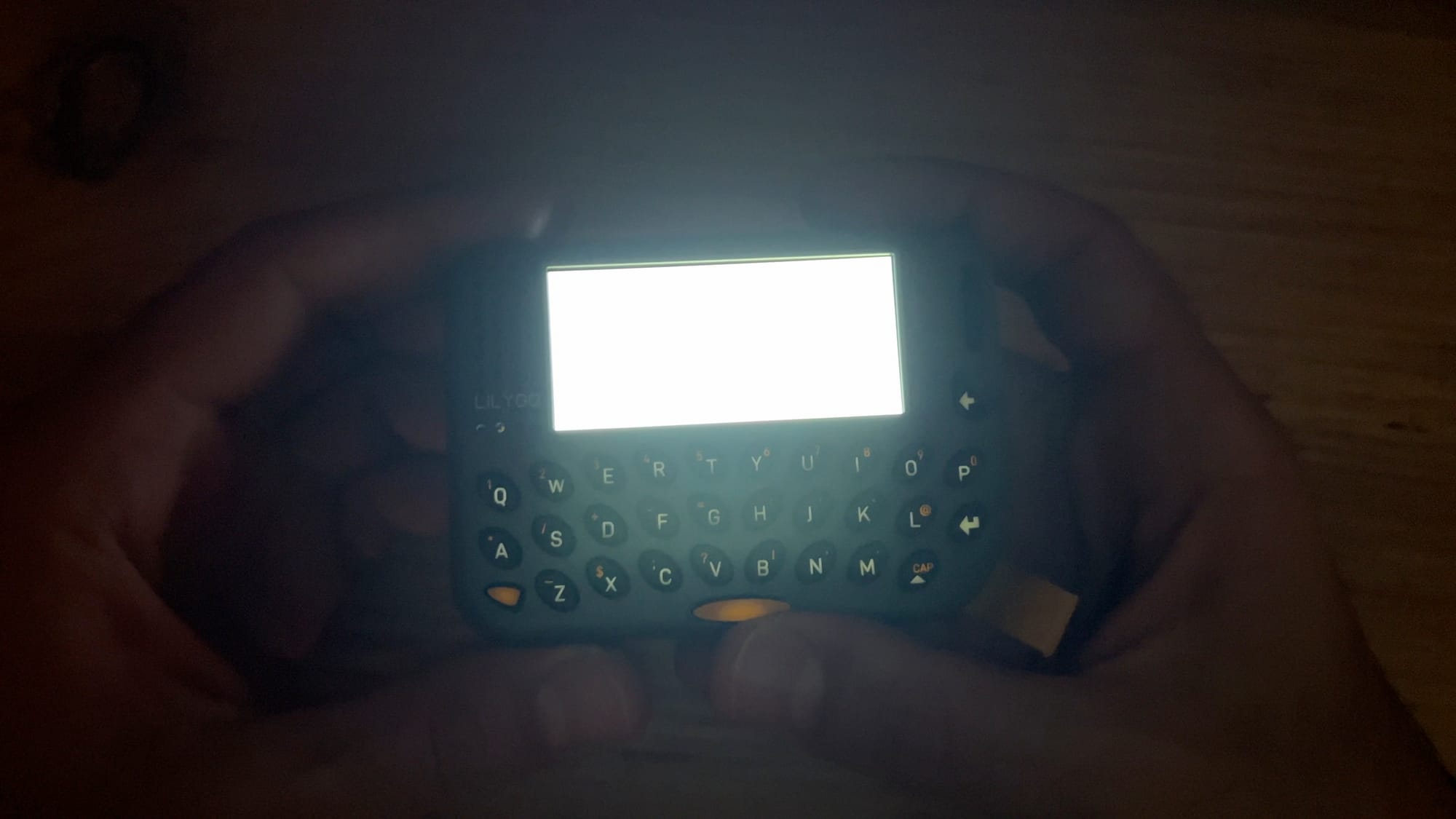
The letterbox screen turns out to suit chat well. You get plenty of lines of text without vertical bulk, and the whole panel is usable.
The keyboard is backlit. This isn't in the spec sheet anywhere and nobody mentions it, which is a shame, because a lit keyboard on an off-grid device at night is a real advantage over every other handheld in this category. The catch: the default Meshtastic build doesn't turn it on. The factory firmware does, and lets you set both screen and keyboard brightness independently along with sleep timeout.
Numbers and symbols live on a secondary layer accessed with a modifier key, printed in yellow on the keycaps. That's the standard approach for keyboards this size and it works fine, but the yellow legends look like the first thing that will wear off. The keys themselves are plastic with a slightly rubbery feel.
Once you're used to the layout you can type without looking, which is more than you can say for most devices this size. The one thing we'd change is press weight, the keys need a firmer push than they should, and over a long message it adds up.
The rotary encoder is the best input on the device. Detented, very smooth, genuinely satisfying to spin. It's also the most underused component here: in Meshtastic it switches between main screens and scrolls the occasional list, and in MeshCore it's worse. That's a firmware gap, not a hardware one, the encoder deserves to do far more.
The Firmware Situation, And a Mistake Worth Avoiding
Here's the thing that reframes most of the criticism this device has taken.
Meshtastic builds two firmware images for the Pager. tlora-pager is the base build. tlora-pager-tft is the one with the full colour LVGL interface — and it's flagged board_level = extra in Meshtastic's build config, which means it doesn't appear in the web flasher by default. You have to explicitly enable extra and experimental builds to see it. We weren't able to find the TFT version on the flasher. If someone know how to flash it, please let us know in the comments section down below
So the obvious path, open the flasher, pick your device, click flash, hands you the build that doesn't make proper use of the screen. On an $88 device whose entire selling point is a colour display and a keyboard, that's a rough first impression, and we think it's behind a real share of the one-star reviews.
We ran the base build, and it shows.
The Factory Firmware
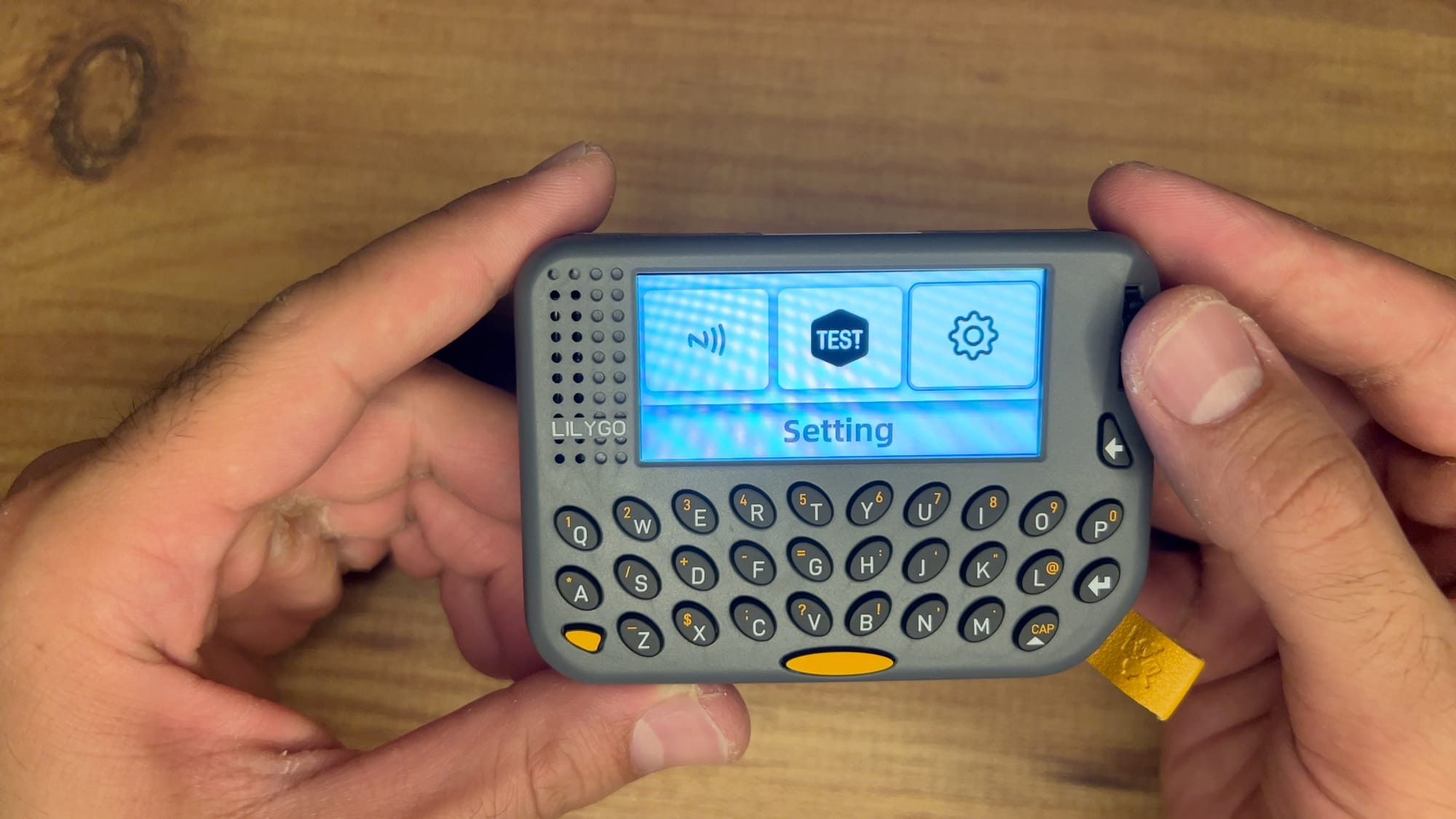
Ours arrived on LILYGO's own firmware, and it's worth a look before you flash it away, though not for the reason you'd think. It's less a product demo and more a factory QA suite: an NFC test, a screen test, a sound test, and a run of other checks that exist so the device can be validated before it leaves the line.
It's also the smoothest software on the device, which tells you something. And it's the only firmware that lights the keyboard.
Living With It: What Actually Works
Some of this is genuinely good and hasn't been reported anywhere, so let's be specific.
It doesn't freeze. Store reviewers report hangs after minutes, periodic restarts, and Bluetooth dropping and refusing to reconnect without a reboot. We haven't had any of that. No lockups, no spontaneous reboots. That directly contradicts the most common complaint about this device. However, if you enable Audio codec it will be stuck in reboot loop. As for the BLE issue, if you have the screen configured to turn off after inactivity, which is the default, yes BLE will drop its connection. Add to that on MeshCore we were not able to activate the BLE.
The speaker is a real speaker. Meshtastic plays its standard notification tune through it, and it's loud and clean, noticeably better than the piezo buzzer chirp you get on most nodes. It sounds like a device rather than a doorbell.
The haptics work. The DRV2605 fires on incoming messages, and it's good enough that you can run the device silent and still not miss anything. Between the speaker and the motor, this is the best notification story in Meshtastic.
You can send a message from the device alone. No phone. Type it on the keyboard, send it. That's the entire point of a standalone handheld and plenty of devices in this category don't manage it.
No thermal problems. It doesn't get warm charging or in use.
And Some Things That Don't
It ships with the region set to UNSET. It will not transmit until you set your region. If your brand-new Pager appears dead on the mesh, that's why, set it to your region in the app or on-device before you conclude anything is broken.
The battery percentage jumps around. This is the frustrating one, because there's a proper coulomb-counting fuel gauge on the board specifically to prevent this. Either Meshtastic isn't reading the BQ27220 and is falling back to a voltage estimate, or it's reading it badly. Whichever it is, one of the genuinely premium components in this device is being wasted.
Flashing Firmware
- Open flasher.meshtastic.org in Chrome or Edge. Firefox and Safari don't support the Web Serial API.
- Select LILYGO T-Lora Pager.
- Flash, then Full Erase and Install for a clean start.
- Set your region immediately. It ships UNSET.
Mark that middle button first, you'll be doing this in the dark otherwise.
Battery Life
The Pager has a 1500mAh cell. That's larger than the ThinkNode M1 (1200mAh), the ThinkNode M2 (1000mAh) and the WisMesh Tag (1000mAh).
It also has an ESP32-S3 at 240MHz driving a backlit colour IPS panel through an LVGL compositor, plus GNSS, plus BLE. Bigger battery, far bigger load.
Owner reports are consistent and not encouraging, one LILYGO reviewer notes the battery "hardly lasts for a day" and that they leave the Pager on the desk and carry a T1000-E instead. Another puts it at around 5 hours. Third-party figures suggest roughly 4 hours active and 14 hours idle with the screen off.
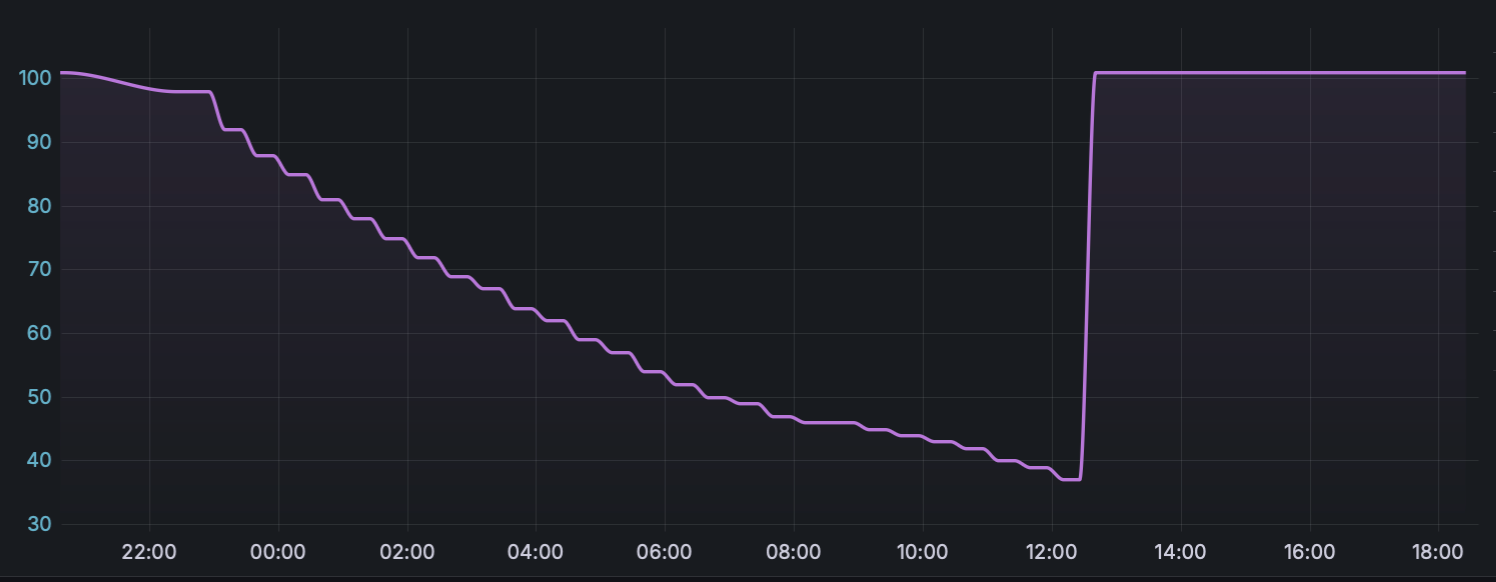
We ran the drain test ourselves, and it's a messier story to tell than a clean discharge curve, because the same fuel-gauge unreliability we flagged earlier showed up mid-test and corrupted the readout.
Started at 100%, GPS on and hunting (it never actually got a fix), screen left to sleep on its own rather than kept on. The percentage came down in a stepped decline rather than a smooth line, you can see it in the graph, consistent with a voltage-estimate readout updating in coarse jumps rather than a continuous coulomb count and got to around 38% after roughly fifteen hours. At that point the gauge appears to have decided the device was charging, jumped straight back to 100%, and sat there flat for the rest of the run. Nothing was plugged in. Same BQ27220 behaviour we called out above, just caught live this time.
That means we don't have a trustworthy number past the 38% mark. What we can say: the device kept actually running for around 18 hours total under these conditions before it died, screen asleep rather than lit. Turn GPS off entirely and we'd expect that to stretch further, though we haven't run that variant separately to confirm by how much.
For real use screen on, typing, checking messages, we'd put it at somewhere between five and ten hours rather than pin an exact figure, because the readout itself was too unreliable to measure precisely and we'd rather say so than fake precision. Either way: this isn't a WisMesh Tag or a ThinkNode M1, sitting untouched for days. It's a get-through-the-day device, use it, charge it overnight, repeat and for something running a keyboard and a colour screen, that's a fair trade rather than a letdown.
Worth pushing back on one common take, though. On the ThinkNode M2 we argued the ESP32 was the wrong choice, tiny device, tiny battery, nothing that needed the horsepower. That argument doesn't hold here. An nRF52840 could not drive this UI. The BHI260AP, the LVGL compositor, the audio pipeline, 8MB of PSRAM, you need an S3. LILYGO didn't pick the wrong MCU. They picked an ambitious feature set, and this is what it costs. However, these numbers are not bad at all. After all it a full blown standalone device, just not the number we are used to from devices used with BLE all the time.
Range Testing
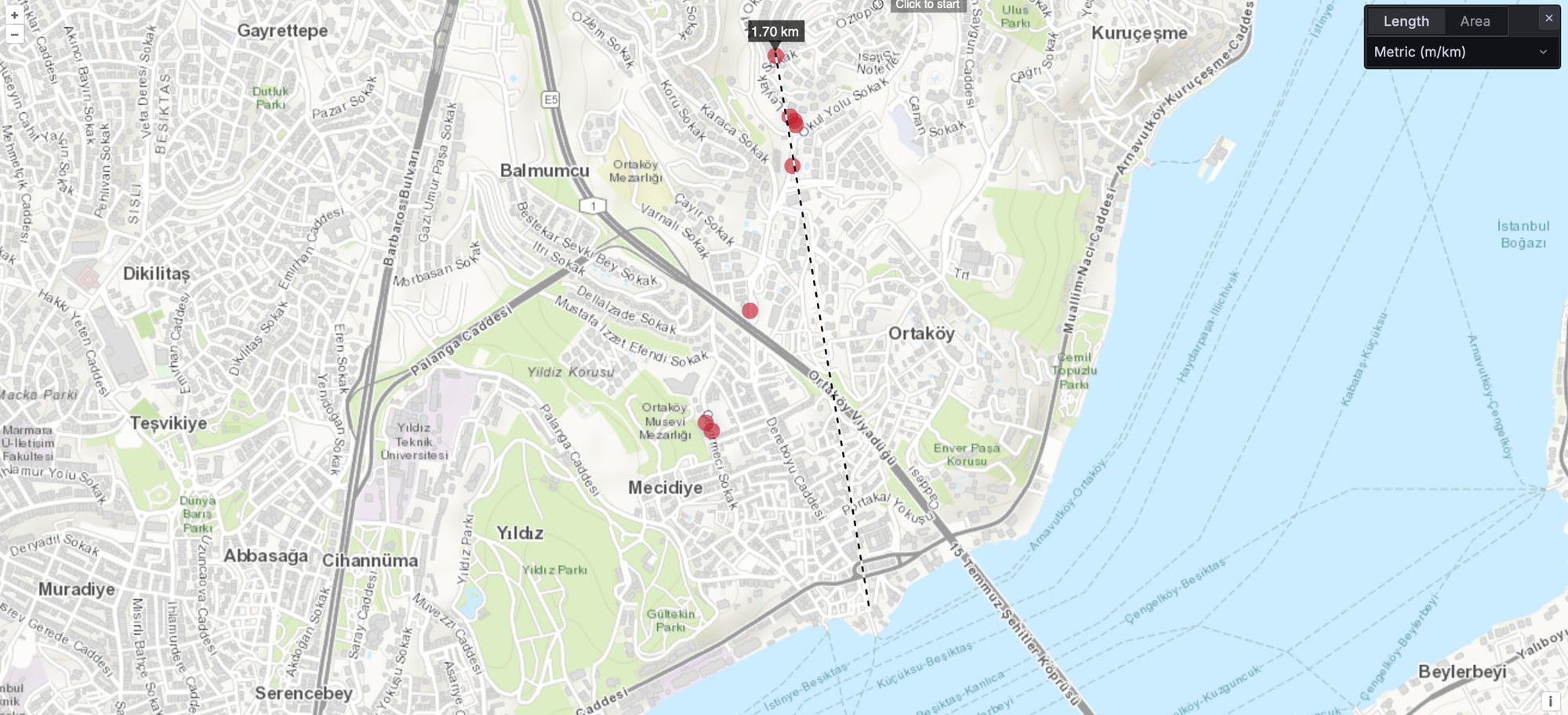
We ran this on our usual route, dense urban, WisMesh Tag as the fixed base, EU868, same path we've walked for every other device in this comparison, and it's the least flattering result in this review.
Standard caveat applies harder than usual here: a walking range test through a city has too many variables, weather, exact position, what's physically between you and the base that day, to treat as a lab number. With that said: signal held up fine for the first stretch, then hit the same dead spots we already know from testing other devices on this route, and came out the other side of them noticeably weaker than what we've logged from the WisMesh Tag or either ThinkNode on the same ground. Around the 1.7–1.8 km mark, a message landed here and there, but not reliably enough to call it a working link at that distance.
For reference, the WisMesh Tag, both ThinkNodes, and the Solar Node P1-Pro have all managed a consistent ~1.7–1.9 km on this same route. The Pager got messages that far occasionally, not consistently, so on range specifically, it's behind the field, not ahead of it.
The 2.4 GHz Question
The LR1121 version can reach 2.4 GHz, and the device has a microphone, a speaker, a headphone jack and a 3W amp. Naturally people ask about voice.
Here's where it actually stands. Meshtastic does have an Audio Module using Codec2, and it's been in the firmware a long time, the iOS app added a config UI for it in May 2026. But the documentation is explicit that it requires an SX128x radio on the LORA_24 region, and the officially supported device list is the LilyGo T-Lora 2.1-1.8 and T3S3. Our radio is the LR1121, a different chip with a different driver. The Pager isn't on that list.
The reason is bandwidth, not effort. Sub-GHz LoRa channels are too narrow to carry continuous audio, even in Short Fast. You need the wider channels 2.4 GHz gives you.
There's also a hard practical wall nobody mentions: you'd need two of them. A 2.4 GHz link only works to another 2.4 GHz radio, and the existing mesh in your area is on 868 or 915.
We're running ours on 868 and it's working well, so we haven't taken it to 2.4 GHz yet. What we can say is that the hardware is there and the band is supported by the chip, which puts this device closer to voice than anything else you can buy today, even though it doesn't do it yet.
However, since we are part of the FLARESAT development team, we are also working on a feature to support voice notes on 2.4 GHz Subscribe to stay in the loop.
If you want the broader picture on audio over mesh, we wrote it up here
 Adrelien
Meshtastic or MeshCore?
We ran both, and the comparison is more interesting than usual.
Meshtastic even on the base build, it feels like a finished product. Stable, predictable, no drama. It doesn't make full use of the encoder or the keyboard backlight, but nothing about it feels like beta software.
MeshCore faster, and it has a map. It also felt rough. Navigation was confusing and the interface felt a bit broken in places, even with a tutorial walking you through it. It reads as a work in progress in a way Meshtastic doesn't.
Two caveats that matter. First, we flashed the Companion BLE build, which is designed to be driven from a phone rather than used standalone, so we're partly judging an on-device experience that build isn't really aiming for. Second, and more seriously: we could not get MeshCore's Bluetooth to turn on at all. We tried everything. That's a blocker, not a UI complaint, and it's why the Flaresat testing below is Meshtastic-only.
Both firmwares can use the microSD slot for offline maps, which is one of the better arguments for this device's screen. No card is included and we haven't tested it yet.
If you want the protocol-level comparison rather than the UI one: Meshtastic vs MeshCore, I Run Both, Here's the Honest Truth.
Using It With Flaresat
Pairing over Bluetooth works exactly as expected in Meshtastic mode: open a Radio group, tap the Bluetooth icon, select Meshtastic, scan, connect. The node ID and battery level appear in the controls panel, and the battery percentage reports correctly.
Because the Pager has GNSS, it shows up as a tracker on the map for anyone else running Flaresat in range. Alert zones monitor LoRa trackers as well as named group members, so if you leave a Pager in a vehicle you get an enter/exit push and a system message in group chat when it crosses a boundary you've drawn.
In MeshCore mode the tracker position has to be pushed manually rather than appearing automatically. And as noted above, we couldn't get MeshCore's BLE working on this device at all, so treat that as untested rather than broken.
One genuine quirk worth flagging: the Pager is built to be used standalone, and Flaresat transmits on a hidden channel. Those two facts don't compose perfectly, you can end up with traffic moving through Flaresat that the device's own screen isn't showing you.
What Else It Does, Because It Does a Lot
The device is nice enough that you end up wishing it did more than chat. It turns out it can.
VibeKeyboard. LILYGO publish a firmware that turns the Pager into a BLE controller for AI coding sessions on your computer. It connects to a daemon on the host and lets you view and switch between up to 32 Claude Code or Codex sessions, see status, context usage, token count and cost, and approve or deny permission requests from the device with the A and D keys. Hold Space and it triggers dictation for voice input.
That's a strange and genuinely great use for a LoRa pager, and it's the clearest signal of what LILYGO think they've built. There's a "Claude Desktop Buddy" guide in the same documentation set too.
Hardware Expansion
- 2×8 2.54mm header carrying I²C, SPI, UART, 5V, 3V3 and GND. The pin headers are in the box under the foam.
- A shield connector on the top edge for add-on boards, including an external antenna shield. Nothing here is used by Meshtastic today.
- microSD up to 32GB, used for offline maps.
- 1/4" tripod thread + 4× M2 pillars. Nobody else in Meshtastic offers this, and it opens up dash mounts, tripods and clamps. The thread looks like a standard one, though we haven't put a mount on it yet.
- Full Arduino / PlatformIO / ESP-IDF / MicroPython support via LilyGoLib, with the schematic PDF and complete pin map published.
How It Compares to the Other Standalone Handhelds
There are three devices in this category, screen, keyboard, no phone required and two of them are also LILYGO's.
T-Deck Plus (~$70–82): The BlackBerry-looking one. 2.8" 320×240 IPS, BlackBerry-style keyboard with a trackball, ESP32-S3, GPS, 2000mAh. As of 2026 it ships with the Fancy UI already enabled and works out of the box, which is precisely what the Pager gets wrong. Bigger battery, more mature software, external antenna.
T-Deck Pro (~$90): 3.1" e-ink at 320×240, 1400mAh, sold in 4G and voice variants. Sunlight-readable and lower power, with e-ink's slower refresh.
T-Lora Pager: The most hardware, the nicest object, the least finished software.
We haven't tested either T-Deck, so take this as preference rather than verdict: the Pager's form factor is the one we'd choose. The T-Decks are phone-shaped, and you're holding a slab. The Pager feels smaller in the hand despite being thick, the foldable antennas are cleaner than a permanent external stub, and the rotary encoder is a nicer control than a trackball. Plenty of people will prefer the phone shape and the upgradeable antenna, and that's fair.
It fits in a jeans pocket, incidentally. Thicker than a phone, but not taller.
Pricing & Value
At around $88, the Pager is one of the expensive ready-to-use Meshtastic handhelds you can buy.
What you're paying for that nothing else offers: two foldable antennas, a tripod thread, a backlit keyboard, a real speaker, working haptics, 16MB of flash, and a documented expansion header. It's the only device in this class where the phrase "small computer" isn't a stretch.
What you're paying for that currently does nothing: the NFC controller, the AI IMU, the audio subsystem, and a 2.4 GHz radio on a band with no ecosystem.
The competition. The ThinkNode M9 at $74.90 is the uncomfortable one, ESP32-S3 + LR1110, 2.4" colour LCD, 37-key keyboard, GNSS, compass, and a 2300mAh battery rated for 2–3 days standby, pre-flashed with your choice of Meshtastic or MeshCore. Same category, cheaper, 53% more battery. It doesn't have audio, NFC, SD, the AI IMU, the tripod mount or a 2.4 GHz option (Be aware that there was a malware discovered on this device.).
The Honest Breakdown
$88 buys more hardware per dollar than anything else in this ecosystem. It does not yet buy more capability per dollar, because a meaningful share of that hardware is idle.
Whether that's a good deal depends on whether you're buying a finished product or buying into a platform.
Final Verdict
What we can say without reservation: this is the best-built standalone device in form factor and hardware. The shell, the packaging, the backlit keyboard, the screen, the speaker, the haptics, nothing else in this ecosystem feels this considered. Judged as an object, it wins, and it isn't close. The 2.4 GHz is also nice to have when the audio support comes in either from Meshtastic, MeshCore or Flaresat.
We can also knock down the biggest complaint about it. Ours doesn't freeze, doesn't reboot on its own, and doesn't drop Bluetooth. Whatever those one-star reviewers hit. It does reboot if you enable the 2.4 GHz along with the audio feature, which is a documented bug and not supported by either firmwares. The Bluetooth drop happens when the screen is going into sleep mode, which is the default for Meshtastic. If you change it, Bluetooth will stay on and that's a firmware issue rather than hardware.
The real complaints are narrower and more specific than the store rating suggests. The two flip-out antennas are flimsy and won't hold position that well. The three side buttons are unlabelled, stiff and awkwardly ordered, which turns routine flashing into guesswork. There's no charge indicator. The battery percentage jumps around despite a premium fuel gauge sitting right there. And the battery itself is not going to last you a weekend.
Nearly everything else is software. LILYGO's factory firmware is smooth and lights the keyboard. MeshCore is faster and has a map but felt rough, and we couldn't get its Bluetooth working at all. Meshtastic's default build is stable and feels finished, but it barely uses the screen, because the build that does is hidden most buyers will never get to.