ThinkNode M3 Review: The Square Tracker That Isn't Trying to Be a Card
Every Meshtastic tracker is a credit card. The ThinkNode M3 is a 64mm square with an adhesive base, and that shape changes what you do with it. Full review.
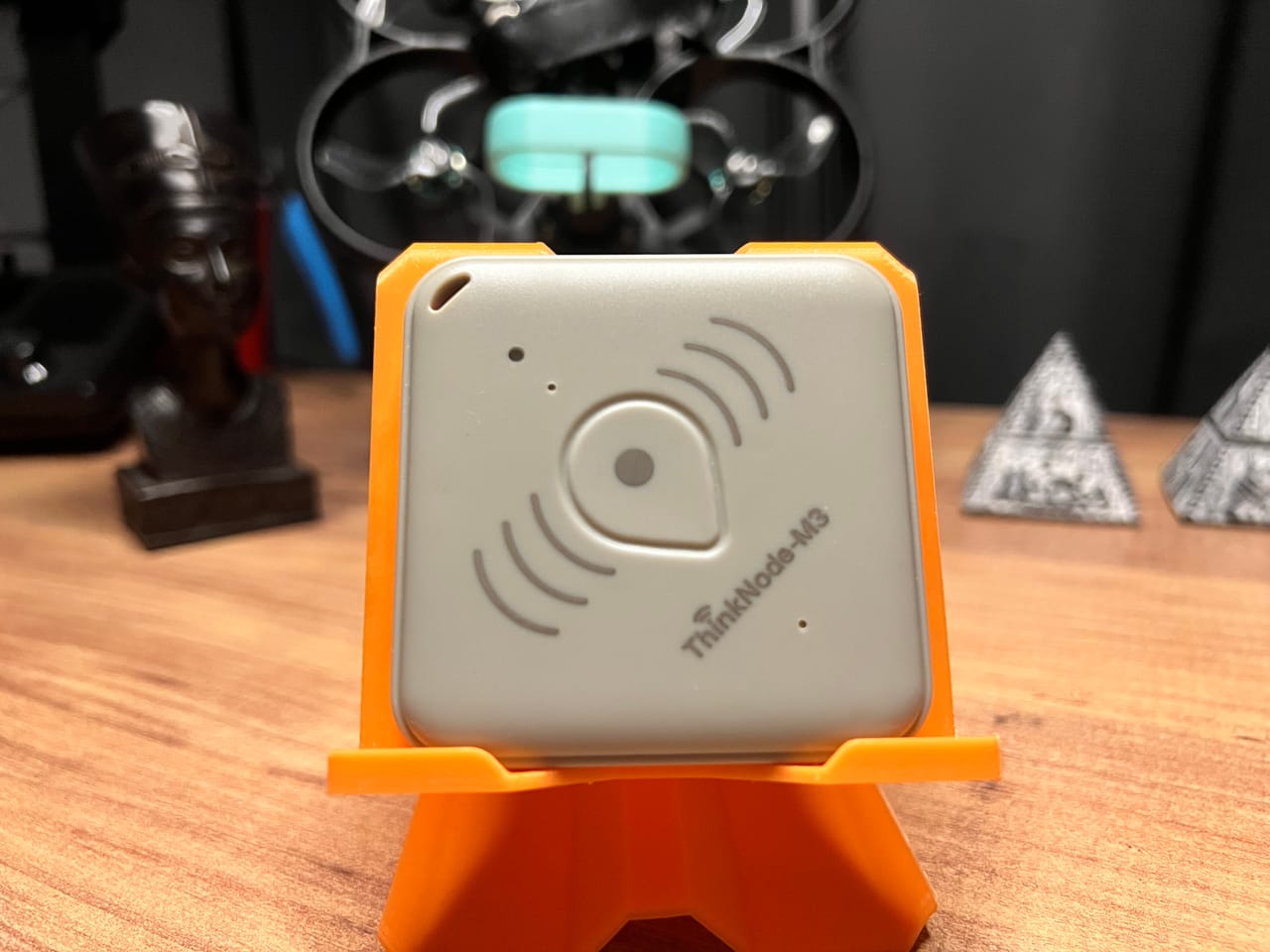
Every compact Meshtastic device we've reviewed has been the same shape. The T1000-E is a credit card. The WisMesh Tag is a slightly bigger credit card. The MeshTracker X1 is a credit card with better GPS. They're all designed to go in a pocket or on a lanyard, and they're all trying to win the same fight.
The ThinkNode M3 is a 64 mm square, 10 mm thick, 40 grams, IP66, and it ships with an adhesive mounting base, two expansion screws and a carabiner in the box. Elecrow aren't subtle about it. This isn't a device you carry. It's a device you stick to something.
That's a genuinely different product, and it's the most interesting thing about it.
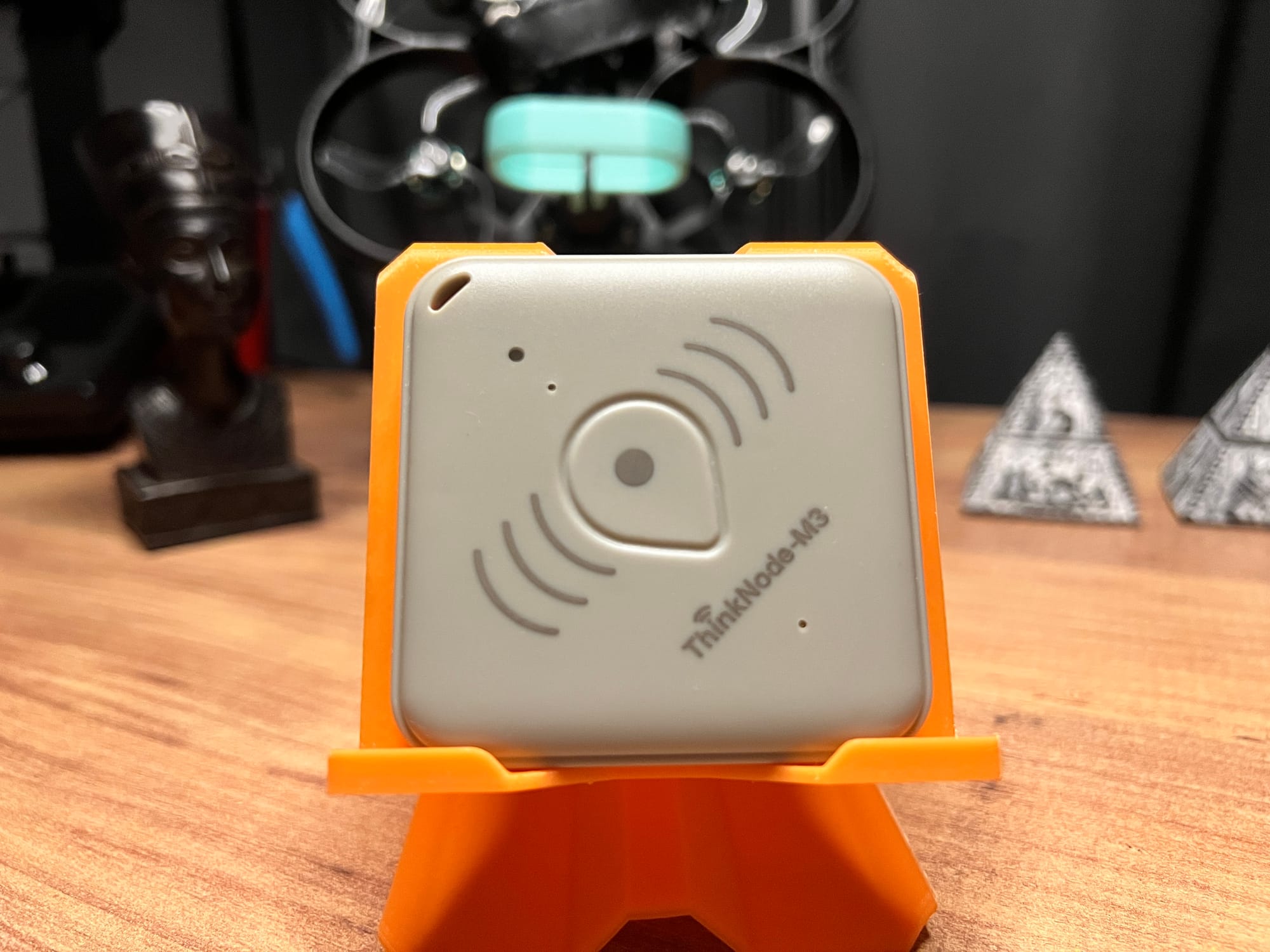
Elecrow ThinkNode M3 Meshtastic / MeshCore
Elecrow ThinkNode M3 Meshtastic / MeshCore
Unboxing and First Impressions
In the box:
- 1× ThinkNode M3
- 1× Magnetic charging cable
- 1× Fixed base + adhesive sticker
- 2× Expansion screws
- 1× Carabiner
- 1× User manual
Look at that list again. A tracker that ships with an adhesive base and screws and a carabiner is telling you something about its intended life. Elecrow's own product copy talks about it being "worn on the body, mounted in a vehicle, or concealed in any location."
Build Quality
It lands between the WisMesh Tag and the T1000-E, which is good company. The PC+ABS shell is solid, the seams are clean, and nothing creaks.
The colour is another matter. It's a cream off-white that reads as 90s yellowed plastic, the shade old computer cases went after a decade in the sun. On a device you're going to stick inside a car or screw to a pallet that genuinely doesn't matter much, and a tracker that disappears against beige surfaces is arguably doing its job. But if you were hoping for the clean white of the X1 or the matte grey of the Tag, adjust expectations.
The button is excellent, and this is a bigger deal than it sounds. It's firm and properly clicky with a clear detent, so you always know a press registered. Anyone who has fought with the T1000-E's vague, mushy button and never been sure whether a triple-press landed will appreciate the difference immediately. Elecrow got this right.
The layout is sensible. On the front face: the lanyard hole top, the indicator light beside it, the temperature and humidity sensor, the button in the centre, and the buzzer below. The back carries the magnetic charging port and the labelling, including the FCC ID.
The Carabiner Doesn't Fit
Elecrow include a carabiner, and it's a decent one, solid metal, good action, nicer than the token plastic hooks that come with most trackers.
It does not fit through the lanyard hole. We tried. The hole is too small for the carabiner's gate to pass through, which means the one included accessory for carrying this device cannot be attached to it without a split ring you'll have to supply yourself.
That's a five-cent fix on Elecrow's side and it's the kind of thing that should have been caught the first time someone assembled a retail box.
The Mounting System
The fixed base is the actual product here, and it's well executed. It's a clip, you stick or screw the base down, then the M3 clips on and off it. Not a one-way adhesive commitment, which matters, because you're going to need to take it off to charge it.
The adhesive is strong. We'd trust it on a car dashboard or a bike frame. And the two expansion screws mean you can mount the base properly to wood or a panel rather than relying on tape at all, which opens up pallets, crates, trailers and equipment cases.
Charging
Proprietary magnetic connector. Same criticism we've made of the T1000-E and the WisMesh Tag: lose the cable and you're stuck until a replacement arrives. It holds well, the magnet grabs properly and doesn't shake loose.
Elecrow sell spares at $1.90, which is cheap enough that you should just buy two with the device. Meanwhile the MeshTracker X1 manages IP66 with plain USB-C, and after two years of magnetic pucks we think that's the right call.
Hardware and Specs, What's Actually Inside
| ThinkNode M3 (Meshtastic) | |
|---|---|
| Price | $39.90 |
| Model | ILO13903D |
| MCU | Nordic nRF52840, Bluetooth 5.0 |
| LoRa | Semtech LR1110, EU868 / US915 |
| LoRa range | 860–960 MHz |
| Max TX | +20 dBm |
| RX sensitivity | −140 dBm or better |
| Data rate | 1.76–62.5 kbps |
| GNSS module | ATGM336H-5NR32 (GPS / GLONASS / Galileo / BeiDou) |
| GNSS sensitivity | −148 dBm cold, −156 dBm hot, −160 dBm reacquire, −162 dBm tracking |
| GNSS accuracy | <1.5 m CEP50 |
| Sensors | Temperature, humidity, accelerometer |
| LED | 1× RGB (red/green/blue) |
| Buzzer | Yes |
| Button | 1× multifunction |
| Battery | 760 mAh Li-ion |
| Charging | Magnetic, 4 pogo pins (USB / DFU / serial / charge), 5 V 0.5 A |
| IP rating | IP66 |
| Antennas | All internal (GNSS / LoRa / Wi-Fi / BLE) |
| Operating temp | −20 to +60 °C |
| Dimensions | 64 × 64 × 10 mm (base: 68 × 68 × 10.2 mm) |
| Weight | 40 g |
| Material | PC + ABS |
| Certification | CE / FCC — FCC ID 2BDNA-TM3-SLE |
The GNSS chip tells you what to expect
The M3 uses an ATGM336H-5NR32, a module built around the AT6558 chipset, the same family as the AT6558R in the WisMesh Tag. Multi-constellation, but single-band L1.
We already know roughly what that means, because we measured it. In our WisMesh Tag review, testing both devices in the same urban location in the same window:
- WisMesh Tag (AT6558R, single-band L1): 8 satellites
- SenseCAP T1000-E (Airoha AG3335, dual-band L1+L5): 11 satellites
So the honest prediction is that the M3 lands in WisMesh Tag territory rather than T1000-E territory for urban acquisition. Not bad, 8 satellites resolves a position perfectly well, but it's a single-band receiver and the physics doesn't care about the marketing. Full explanation here
 Adrelien
The +20 dBm footnote
Elecrow list maximum transmission power as +20 dBm. Most devices on our comparison chart are +22 dBm. Two decibels is a real difference and it belongs in the table, but it's a small one, against a LoRa link budget of well over 140 dB, it's the kind of gap that disappears into terrain, antenna orientation and whether the device is in your pocket. We'll come back to this in the range test, where it turns out to matter, though not for the reason you'd think.
The Button, the LED and the Buzzer
Elecrow document the hold timings in their wiki but say nothing about the press patterns. In practice the M3 uses Meshtastic's standard user-button behaviour, so the full map is:
| Action | What it does |
|---|---|
| Single press | Send node info to the mesh |
| Double press | Ad-hoc position ping to the network |
| Triple press | Toggle the GPS module on/off |
| Quadruple press | Temporarily mute / unmute |
| Hold 3 s | Power on |
| Hold 5 s | Shutdown / sleep |
| Hold 10 s | Force restart |
| Hold 20 s+ | Enter programming mode (see Flashing) |
That matches the convention the T1000-E, WisMesh Tag and MeshTracker X1 all use, which is exactly what you want. No invented scheme, no relearning.
The LED and buzzer work together, which is unusual in this category and genuinely helpful on a device with no screen:
| State | LED | Buzzer |
|---|---|---|
| Powering on | Red, solid 5 s | 2-second tone |
| Ready to pair | Blue, flashing continuously | — |
| Connected | Blue off | — |
| Entering sleep | Red, flashing rapidly 3 s | 3-second tone |
The LED is bright enough to read in daylight through the housing, which the T1000-E's single green LED often isn't.
Having both an audible and a visual confirmation of power-on and power-off solves the problem every screenless tracker has: knowing whether the thing in your hand is actually on. The WisMesh Tag solves it with three dedicated LEDs. The M3 solves it with one RGB LED plus a buzzer. Both work, and the M3's approach means you can confirm state with the device in a bag.
The SOS Button That Isn't
Elecrow's specification table lists the button as "Power On/Off/SOS Trigger", and their product copy promises "a one-touch alert function allows for quick distress signals in emergencies."
We can't find it, and neither can Elecrow's own documentation. Their wiki's Button Function Guide covers power on, sleep and reset, no SOS. And Meshtastic's standard button handler has no SOS action at all; the press patterns are the ones in the table above.
Which brings us to the bigger issue with this product page.
Let's Talk About the Feature List, Because Most of It Isn't Real
This is the least comfortable part of the review and the most useful.
Elecrow's Meshtastic M3 materials carry a feature list including:
- "Three working modes: standby, normal, and trigger"
- "Powerful client interface"
- "Customized sensor thresholds, the device will automatically alarm when out of range"
- "Reporting time setting"
- "Offline data caching, when there is no network connection, the device can cache data and upload it after the network is restored"
- "One-click search function"
- A one-touch SOS alert
None of that exists in Meshtastic. Those are LoRaWAN platform features belonging to the cloud-console workflow that the LoRaWAN version of the M3 is designed for. The copy has been reused across both product pages.
You don't have to take our word for it, because Elecrow's own Meshtastic wiki page gives the game away in its second paragraph:
"The ThinkNode-M3 LoRaWAN Tracker uses a magnetic charging design..."
That's on the Meshtastic product page. The same page also contains a sentence where two copy blocks have been pasted into each other mid-word, leaving "quick distress signals in eme[...]rgencies" with eighteen words of unrelated text wedged in the middle. Further down, the usage example is about the ThinkNode M4, the setup instructions tell you to prepare two M5, M1 or M2 devices, and the pairing section explains that "the default code for the ThinkNode M6 is 123456."
This isn't a conspiracy, it's a documentation problem, and it's the single thing most likely to leave a buyer confused about what they bought.
Same story with "GPS / Wi-Fi Scan / BLE Beacon Function for Positioning" in the product title. The LR1110 genuinely does have Wi-Fi passive scanning and GNSS scanning built in, but both work by capturing signals, compressing them, and shipping the result to a cloud solver that computes the position. That's a LoRaWAN asset-tracking architecture. Meshtastic doesn't implement it, doesn't have a solver, and doesn't need one, because the M3 has a perfectly good dedicated GNSS module doing the job the normal way. Elecrow do footnote this "Wi-Fi and Bluetooth only support Wi-Fi scanning and Bluetooth beacons", but you'd need to already know what that sentence means to decode it.
What you actually get is what you get on every Meshtastic device: position broadcast, environment telemetry, messaging, node info, and the standard button map. That's a good feature set. It just isn't the one on the page.
This isn't us dunking on Elecrow. Their hardware has been consistently good and the M1 is still one of the nicest handhelds you can buy. It's a copy problem, not a product problem. But if you buy this expecting threshold alarms, offline caching and an SOS button, you're going to be disappointed, and it's our job to save you that.
The Sensors, and What Meshtastic Actually Uses
The M3 has temperature, humidity and an accelerometer on board. That's the best sensor loadout in this price bracket, the WisMesh Tag has none, the T1000-E has temperature and an accelerometer, and the MeshTracker X1 has a barometer with temperature derived from it.
Temperature and humidity work. Both appear in Meshtastic's environment telemetry, broadcast over the mesh, and pipe into Grafana like any other node. Nothing else at $39.90 gives you humidity.
One caveat we've made before and it applies here: the sensors sit in a sealed IP66 enclosure. Readings reflect the inside of the case, and in our testing the temperature runs a couple of degrees above ambient. On a device stuck to a dashboard in the sun that gap will be far larger. Fine for trend data, don't build a weather station on it.
The accelerometer is a different story, and the answer isn't the one we hoped for.
Going in, the interesting possibility was motion-triggered behaviour: broadcast position when moving, sleep hard when stationary. On a mountable tracker that's the difference between charging weekly and charging every day and a half.
Meshtastic doesn't do that. Its accelerometer support, AccelerometerThread, which handles a dozen different chips, exists to wake the screen on tap or motion and to detect double-taps as button presses. The user-facing setting is literally called display.wake_on_tap_or_motion.
The M3 has no screen.
There is no motion-triggered position broadcast in Meshtastic. The feature that saves power on a moving tracker is Smart Position Update, and it works off GPS distance thresholds, not accelerometer data. It'll work fine on the M3, and it doesn't need the accelerometer to do it.
To be clear about where the gap is: this isn't Elecrow shipping a dead part. They put a useful sensor on the board and Meshtastic hasn't got a use for it on a screenless device yet. We found exactly the same thing with the LIS2DH on the WisMesh Tag. It could change with a firmware release, and if it does the M3 is sitting there ready for it. Just don't buy it for that today.
Flashing Firmware, and the 20-Second Button Hold
The M3 is nRF52840-based, so flashing is the easy path: it mounts as a USB drive and you copy a UF2 file across. No drivers, no esptool, no Python.
- Meshtastic Web Flasher in Chrome or Edge
- Select Elecrow ThinkNode M3
- Choose your firmware version, click Flash
- Enter programming mode (below), a drive called ELECROWBOOT appears
- Copy the UF2 across
Firmware file: firmware-thinknode_m3-X.X.X.xxxxxxx.uf2
Getting into programming mode is the part worth knowing about. You hold the button for 20 seconds. In practice it feels like thirty and you will be convinced it isn't working. Keep holding. The ELECROWBOOT drive appears and you drag the firmware in the device will reboot by itself. To exit, hold for 10 seconds, then 3 seconds to power back on.
Two notes from doing this for real:
- The magnetic cable carries USB data, which is how the drive appears at all, four pogo pins handle USB, DFU, serial logging and charging. But the T1000-E trick of disconnecting the charger mid-press to force DFU doesn't apply here. We tried. Holding the button is the only route in.
- If the drive disconnects mid-copy and throws an error, that's normal nRF52 behaviour. The device ejects itself the moment the transfer completes and reboots. Wait a few seconds.
Elecrow also note that if the device ever becomes bricked, connecting it to a computer over USB will restart it.
Compared to the T1000-E's fiddly button-plus-charger-disconnect dance, a long button hold is a clear improvement. It's less elegant than the WisMesh Tag's dedicated back button, but it works every time and there's nothing to get wrong.
Battery Life
Elecrow give two different numbers on the same page: "can support at least 12 hours of use" and "the message is sent once every minute and can work for up to 18 hours."
The second is the more useful one because it states its conditions. So we ran it with GPS off and logged the whole thing to Grafana via Harbor Scale.
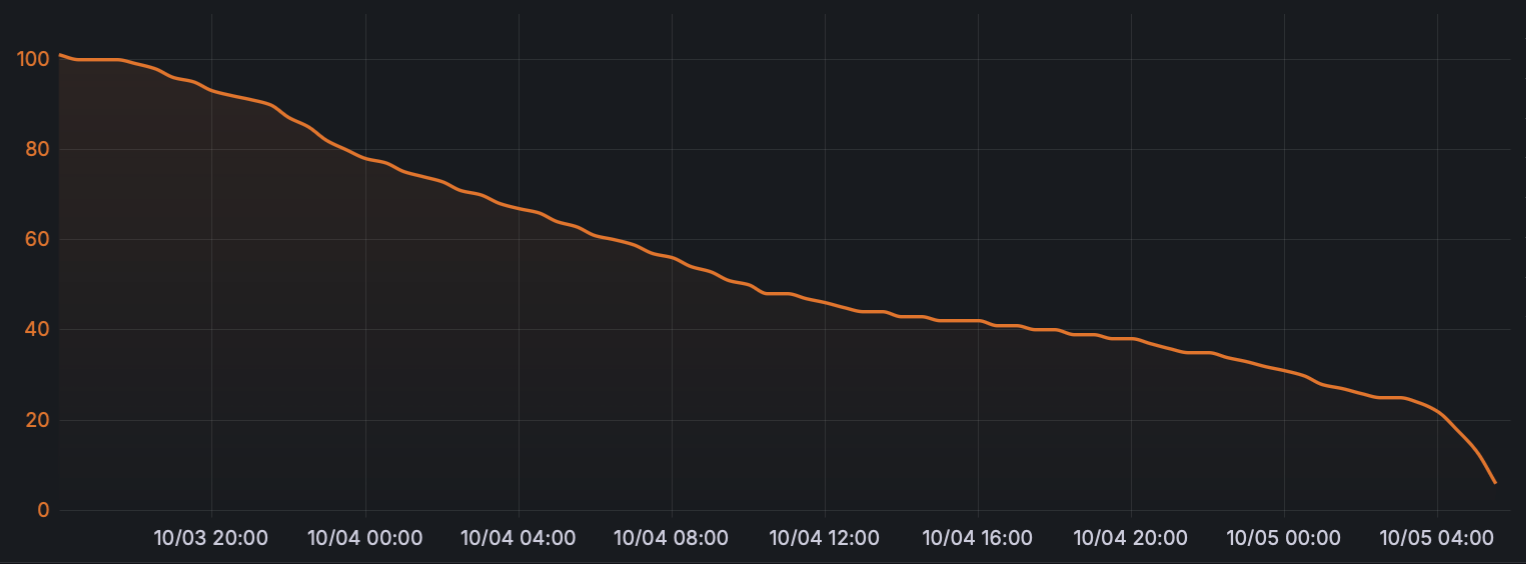
The M3 ran for 37.5 hours, from 100% down to 6%, with GPS disabled the entire time. Extrapolating the last few readings to zero puts a full cycle at roughly 40 hours. Call it a day and a half.
Before anyone reads that as beating Elecrow's number, it isn't. Their 18-hour claim is explicitly at one message per minute with the GPS working. Ours is 37.5 hours with the GPS off, indoors. Those are different tests and the comparison doesn't hold in either direction, we still haven't verified their 18 hours, and they haven't claimed ours.
What the GPS-off number does let us do is put the M3 against the rest of the category on equal terms, because that's how we measure all of them. That comparison is less kind.
Average drain worked out to 2.5% per hour, or about 60% a day.
| Device | Battery | Runtime |
|---|---|---|
| RAK WisMesh Tag | 1000 mAh | 5–6 days (GPS off) |
| SenseCAP MeshTracker X1 | 1100 mAh | up to 5 days (claimed) |
| SenseCAP T1000-E | 700 mAh | 2–3 days (GPS off) |
| ThinkNode M3 | 760 mAh | 37.5 hours (GPS OFF) |
Same test, every device. The M3 comes last, and not narrowly: the WisMesh Tag runs three and a half times longer, and the T1000-E runs longer on a smaller cell. Divide capacity by runtime and the M3 draws about 20 mA against the Tag's 7.6, the highest of any tracker we've measured. That's a real mark against it, and it lands on the one use case the device is built for. We'll chase the why in a GPS-on run, but there's no reading of this table where the M3 wins on battery.
What this means if you're mounting it
This is the number that answers the question we raised earlier, and the answer is a qualified yes.
A day and a half of continuous means that if you clip the M3 to a bike or a vehicle and leave it broadcasting position at a normal rate, you're unclipping it to charge every other day. That's workable for an active trip, a race weekend, a convoy run, or a few days of fieldwork. It is not "stick it on and forget about it for a month."
If you want that, the M3 can get much closer, but you have to configure for it: set the device role to TRACKER, enable power saving, and stretch the GPS update interval out. Trade position resolution for runtime and the numbers change a lot. The hardware supports it, this is a configuration decision, not a hardware limit.
Water Resistance
IP66, dust-tight and rated for powerful water jets from any direction. Same rating as the WisMesh Tag and one step above the T1000-E's IP65.
The magnetic charging connector is almost certainly why it's IP66, no USB-C port means no hole in the case. That's the trade the whole category keeps making, and the MeshTracker X1 is notable for claiming IP66 with USB-C.
Range Testing
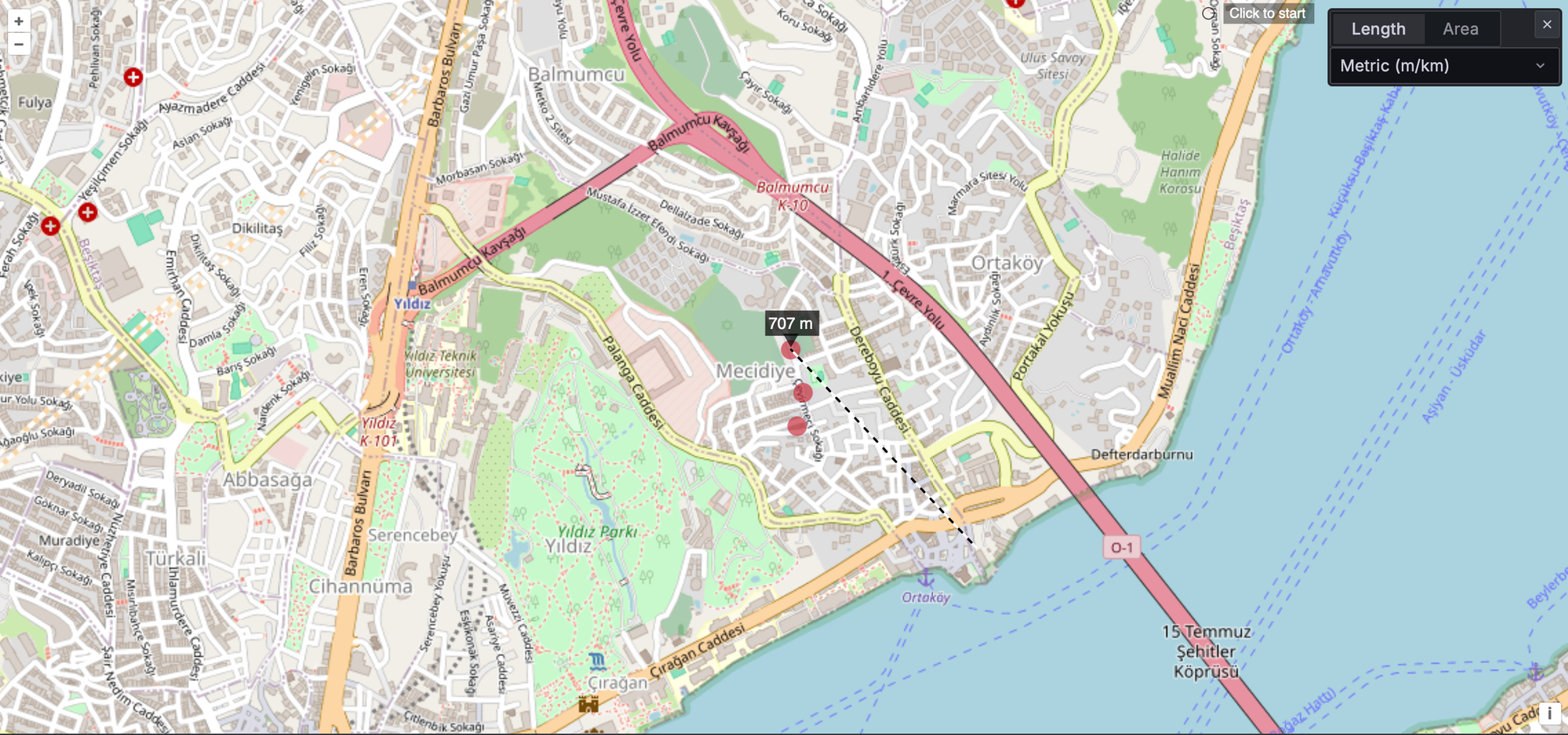
Same test we run every time: a card tracker as the fixed base, walk away with the device under test, and mark the point where acknowledgements coming back. Dense urban, EU868, no clean line of sight for most of the route. It's the same walk that gave us 1.71 km with the WisMesh Tag and 1.90 km with the Solar Node P1-Pro.
The M3 managed 707 metres.
That is not a soft result. It's the worst figure we've recorded from any device on this route, by a long way.
| Device | Range on this route |
|---|---|
| SenseCAP Solar Node P1-Pro | 1.90 km |
| SenseCAP T1000-E / Wio Tracker L1 Pro | ~1.8 km |
| RAK WisMesh Tag / ThinkNode M1 / M2 | 1.71 km |
| Elecrow ThinkNode M3 | 0.71 km |
The M3 reached 41% of the WisMesh Tag's distance on the same walk. We expected it to land slightly behind the pack. We did not expect it to land less than half way.
Earlier in this review we looked at Elecrow's +20 dBm against the +22 dBm most of the category runs, and said two decibels was a real difference but a small one, and that we weren't expecting it to show up in the range test.
What we think is actually happening
The most likely explanation is the shape, and it's a physics problem rather than a manufacturing one.
At 868 MHz a quarter-wave antenna is 86 millimetres. That's the length an efficient internal antenna wants, and it's also roughly the ground plane it wants underneath it. Look at what each device gives it:
| Device | Longest dimension | Against a quarter wave |
|---|---|---|
| RAK WisMesh Tag | 92 mm | 106% |
| SenseCAP MeshTracker X1 | 90 mm | 104% |
| SenseCAP T1000-E | 85.6 mm | 99% |
| ThinkNode M3 | 64 mm | 74% |
Every card tracker in this category is, almost exactly, one quarter wavelength long at 868 MHz. That is not a coincidence. The M3 is a 64 mm square, and there is nowhere inside it to put 86 mm of anything.
An electrically short antenna in a small ground plane loses efficiency fast, and losing 9 or 10 dB to it is entirely ordinary. That's a factor of ten in radiated power, from a part you can't see and the spec sheet doesn't mention.
Which brings us back to the thing this review has been circling from the first paragraph. The square is what makes the M3 mountable, and the square is what makes it a worse radio. It isn't a design flaw, it's the bill for the design. We just didn't expect the bill to be this size.
Using It With Flaresat, and Why This Device Specifically
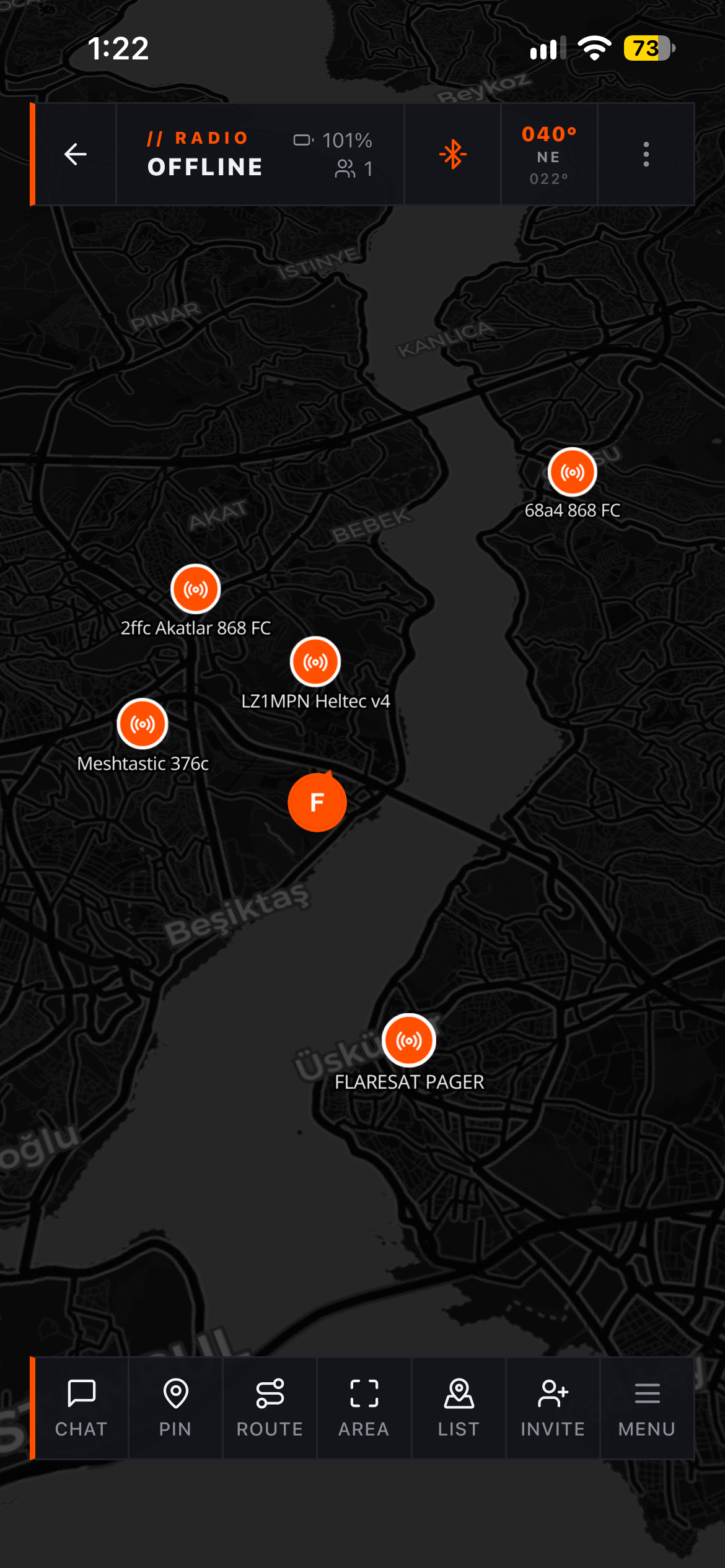
Full disclosure, We build Flaresat. But the M3 is the device in this batch where the integration story is most obviously the point, so let's be specific about it rather than hand-wavy.
Any radio device broadcasting a GPS position shows up on the Flaresat map as a tracker. Not just Flaresat users, any Meshtastic or MeshCore node sharing its location. It's labelled with the node's name from its firmware config, or Node XXXX if there isn't one. You don't configure anything. Power the M3 on with GPS enabled, and it appears.
There's a detail here that matters more on this device than on any other: you can toggle the M3's GPS on and off from inside Flaresat, without touching the device or opening the Meshtastic app. On a tracker you've clipped inside a vehicle or screwed to a crate, that's the difference between a sealed box you have to physically retrieve and a tracker you actually control. Turn GPS on when you need a position, turn it off again to save battery.
That alone is useful. The part that makes the M3 specifically interesting is geofencing.
Flaresat monitors LoRa trackers against alert zones automatically, draw an area on the map, enable the alert zone, and when a tracker crosses the boundary you get a local notification and a system message in the group chat:
── Node A3F2 entered [Base Camp] ──
It works on enter, exit, or both. It runs entirely on-device, with no internet. It works with Meshtastic and MeshCore. And it activates the moment a tracker's position packet reaches your connected radio.
Now put that together with what the M3 physically is. A 64 mm square with an adhesive base and screw mounts, IP66, 40 grams, and a battery that lasts.
- Stick it inside the car. Draw a zone around the house. Get a message when the car leaves.
- Screw it to a trailer, a generator, a piece of kit at an event. Draw a zone around the compound.
- Put it on the dog. Draw a zone around the field.
- Give one to each vehicle in a convoy and watch them all on one map with no cell service.
That's an off-grid asset-tracking system for $39.90 a node and no subscription, and it works in places where a Tile or an AirTag is a paperweight. The M3's shape is what makes it the right device for it, and it's the reason We'd pick it over a card-shaped tracker for anything that isn't going in a pocket.
Meshtastic or MeshCore?
Elecrow support flashing MeshCore on the M3 and link it directly from the product page. We flashed it and it runs.
For a pure tracker this is a closer call than usual — both firmwares broadcast position, both work with Flaresat, both do geofencing through the app. Our full comparison is here: Meshtastic vs MeshCore, and the summary applies. Meshtastic for the bigger community and easier onboarding, MeshCore for better behaviour on busy regional networks.
For this device specifically, there's one tiebreaker: background geofencing in Flaresat is more reliable on Meshtastic, for the reason in the callout above. If you bought an M3 to stick to something and get alerts when it moves, that's the deciding factor.
Pricing & Value
$39.90 drops the M3 into the most contested price point in Meshtastic.
SenseCAP T1000-E: $39. 700 mAh, IP65, 85 × 55 × 7 mm, dual-band L1+L5 GNSS (AG3335), temperature sensor, buzzer, magnetic puck, single green LED, 2–3 days. Mature firmware, the reference device. Better GPS, worse battery, awkward DFU, vague button.
RAK WisMesh Tag: $39. 1000 mAh, IP66, 92 × 59 × 7.5 mm, single-band L1 GNSS (AT6558R), buzzer, three dedicated LEDs, dedicated reset/DFU buttons, lanyard included, magnetic puck, 5–6 days. Best build quality we've handled. No temperature sensor. Still our pick for pure EDC.
SenseCAP MeshTracker X1: $49.90. 1100 mAh, IP66, 90 × 57 × 8 mm, dual-band L1+L5 GNSS, barometer, LR2021 radio, USB-C, buzzer and vibration motor, RGB LED, up to 5 days claimed. Ten dollars more and the most capable tracker in the category on paper.
ThinkNode M3: $39.90. 760 mAh, IP66, 64 × 64 × 10 mm, single-band L1 GNSS (ATGM336H), temperature + humidity + accelerometer, RGB LED + buzzer, excellent button, easy DFU, clip-on base with adhesive and screws in the box, +20 dBm.
The honest breakdown
At the same money as the T1000-E and the WisMesh Tag, the M3 wins on exactly two things and they're both real:
The sensor loadout. Temperature, humidity and an accelerometer for $39.90 is the best sensor package in the category. Nothing else at this price has humidity, and the accelerometer has upside if the firmware uses it.
The mounting story. A square with an adhesive base and screw holes is a fundamentally different tool from a card on a lanyard. If your use case is "attach this to a thing," the M3 is the only device here designed for it.
What you give up: the best-in-class battery life goes to the WisMesh Tag, the best GPS goes to the T1000-E and the X1, and the best build quality and notification experience still goes to the WisMesh Tag with its three dedicated LEDs.
So the recommendation writes itself along use-case lines rather than "which is better":
- Carrying it every day, in a pocket, on a lanyard? WisMesh Tag. Not close.
- GPS precision under trees and buildings matters most? T1000-E or X1.
- Sticking it to a vehicle, a bike, a bag, a piece of equipment, and wanting environment data too? M3.
That's a real niche and nobody else is serving it.
And this is where we should be straight with you, because judged as a general-purpose Meshtastic device the M3 is mid-pack. The GPS is beaten, the battery is beaten, the build quality is beaten. If you put it head-to-head on a spec sheet against a WisMesh Tag or a T1000-E, it doesn't win.
Judged as a tracker, it's a different conversation. Set it to TRACKER role, turn on power saving, stretch the GPS interval out, clip it to the base and stick it where it needs to go. No subscription, no cloud account, geofencing through Flaresat, and it relays for your own private network while it's sitting there. That's a genuinely good tracker for $39.90.
The honest caveat is that almost none of that is unique to the M3. You can set a T1000-E or a WisMesh Tag to TRACKER role too, and they'll do the same job with better GPS or better battery life. What they won't do is clip onto a base you've screwed to a crate, or stick to a dashboard and come off again when you need to charge it.
So the M3 isn't the best tracker in the category. It's the only one built to be mounted, and if that's your problem, nothing else solves it.
Final Verdict
Everyone else in this category is building the same credit card. Elecrow built a square with a clip-on base, and that one decision is what makes the M3 worth writing about.
It is also, as it turns out, what you pay for twice.
The battery is the shortest in the category. 37.5 hours with the GPS off, where the WisMesh Tag runs three and a half days longer on the same test, and the T1000-E runs longer on a smaller cell. Now there could be a software issue we are not aware of but that is out of our scope.
And the range is the shortest we've measured from anything. 707 metres on a route where the Tag does 1.71 km and the P1-Pro does 1.90 km. Two decibels of transmit power accounts for almost none of that gap. A 64 mm enclosure trying to hold an 86 mm antenna accounts for most of it.
Neither of those is Elecrow being careless. Both are the square being a square. But a buyer deserves them stated plainly, because together they draw a hard line around what this device can do.
So let's be precise about the trade, because it's a narrower one than we thought when we started.
What you get is a mounting system nothing else in the category offers, the a working sensor package at this price, a properly clicky button, an LED and buzzer that tell you what's happening without a screen, IP66, and flashing that behaves the same way every time. At $39.90, with no subscription and no cloud account, you can stick a self-relaying Meshtastic node to an object and get geofenced alerts when it moves.
What you give up is range and endurance, and you give up more of both than the spec sheet suggests.
That rules out the use case most people will picture first. Put the M3 in a car, watch the car drive away, and you'll lose it inside a kilometre unless there's mesh along the route. It is not a vehicle recovery tracker and we'd be doing you a disservice to let you buy it as one.
What it's genuinely good at is the opposite shape of problem: things that stay put, or stay close. A generator in a yard. Equipment cases at an event. A trailer in a compound. Vehicles in a convoy that are all within a few hundred metres of each other anyway or with a good mesh coverage. In every one of those, 700 metres is more than enough, the mesh fills the gaps, and the clip-on base is the thing no card tracker can match.
So the recommendation comes down to what you're actually doing:
Carrying a Meshtastic device every day? Buy a WisMesh Tag. Better built, more than double the range, three and a half times the battery, and its carabiner fits.
GPS precision under trees and between buildings? T1000-E or MeshTracker X1.
Tracking something that moves a long way from you? None of these. That's not what a mesh tracker is, and the M3 is the least suited of the four.
Attaching a node to a thing that stays within reach of your mesh, a crate, a generator, a trailer, a bike in a shed, a dog in a field, the M3 is the only device here built for the job, and nothing else in the category solves the mounting problem at all.
That's a narrow recommendation, and after the range result it's narrower than it was. But it's a real one. The M3 isn't the best tracker in the category, and this review has now measured two separate ways in which it isn't. It's the only one you can bolt to something, and if that's your problem, nothing else solves it.